You run a Lovable app with paying users and no developer on staff. Someone told you to connect GitHub so you’d own your app, and you did it. That was good advice, correctly followed.
The trouble is that Lovable GitHub export ownership gets answered as a single yes or no, when it has seven separate parts. The repository in your account is one of them. The other six are your database, your user accounts, your uploaded files, your secrets, your DNS records, and whatever builds the site your customers load. None of those is a file, and a repository carries files.
By the end of this post you can name which of the seven you control today, and which sit in an account someone else administers. Every platform claim below was checked against vendor documentation on 2026-08-14.
TL;DR
- The export transfers the code layer in full: a standard Vite + React project in your own account, which you can clone and self-host without restriction.
- Six layers do not travel with it. Database, auth users, storage objects, secrets, DNS records and the deploy pipeline are account-level things, not files.
- The check below turns the one answer into seven, and the section after it gives what each unowned layer takes to move, in dependency order.
Why “export it to GitHub” is good advice
Start with the part that is simply true, because it is Lovable’s own documented position. The ownership page states: “All Lovable projects can be continuously synced to GitHub or GitLab at any time using Git sync. You can clone your repository, modify it outside Lovable, deploy it on your own infrastructure, or fully self-host without restriction.” It also describes what you get, which is not a proprietary bundle: “Applications are standard Vite + React projects that can run on major cloud providers (AWS, GCP, Azure), managed hosting platforms, or self-hosted infrastructure.”
That is a real transfer rather than a gesture. The repository is created under the GitHub account or organisation you authorised, and Lovable’s GitHub documentation notes that “Repositories created by Lovable are private by default, on every plan.” The intellectual-property question is settled too. The ownership page says plainly that you own your code, and because the repository sits in your GitHub account rather than Lovable’s, it does not depend on your subscription staying active.
One line on that page goes further than the rest: “Your database, storage, and configuration are portable.” Hold onto the last word. Portable is not the same as carried by the repository, and the rest of this post measures the gap between them. The conflation worth breaking is legal ownership standing in for operational ownership.
What the export actually hands you: the code layer
What lands in the repository is the application source, the configuration files, and a committed .env holding build-time VITE_* values. Those values are public by nature, since Lovable describes them as “embedded into the client bundle at build time and are safe to be public,” so a .env in your repo is not your credentials (Lovable docs).
The sync has edges. Lovable “only edits and syncs one branch at a time,” and the direction is one-way: “You can only export from Lovable to GitHub, not the other way around.” You cannot import an existing repository. Deleting the repo breaks the connection, and so does transferring it to another owner, because “the project stays attached to the original owner’s connection.” Renaming it is the exception that catches people out in the other direction, since sync survives a rename: Lovable detects it and updates the connection.
Sync is also a code path, so files that behave like data hit its size limit:
Your project contains files that exceed the maximum file size limit (100 MB)If you have seen that message, the repo is not carrying everything in your project.
Everything named in this section is a file. The next six layers are not, which is the whole reason the repository cannot carry them.
The six layers the repository does not carry
Take them one at a time, in this fixed order: database, auth, storage, secrets, domain, deploy. That order is for counting, not for moving. The migration order differs, and the section on closing the gap explains why the domain goes last.
Database
Which answer applies depends on which backend the app talks to, and there are only two cases.
If you connected your own Supabase project, this layer is already yours, and nothing about the repo landing in your account changes that.
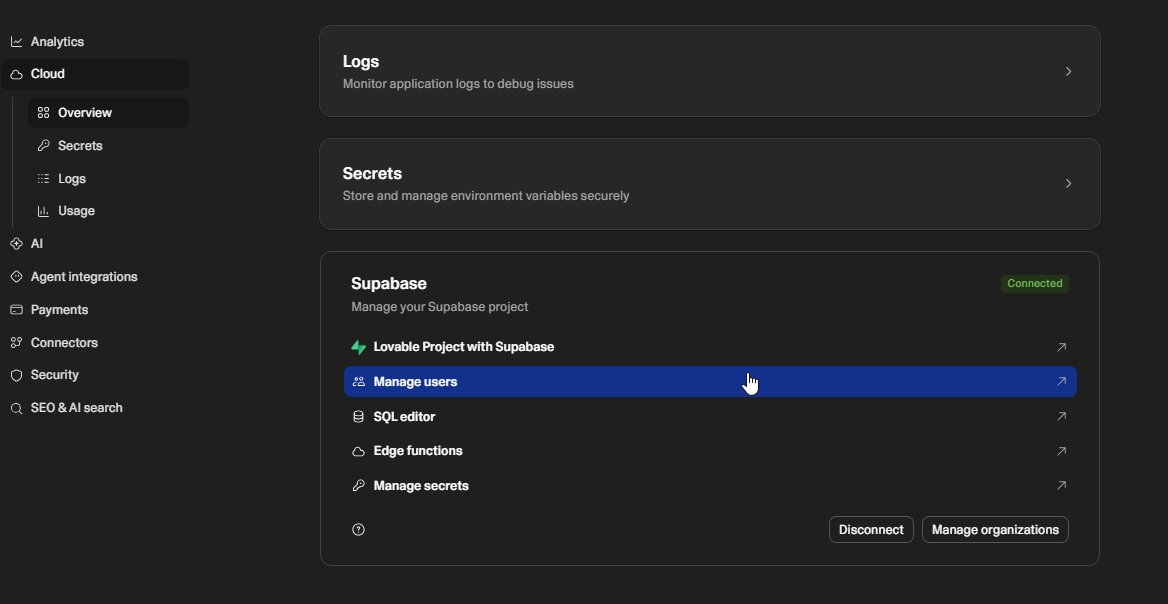
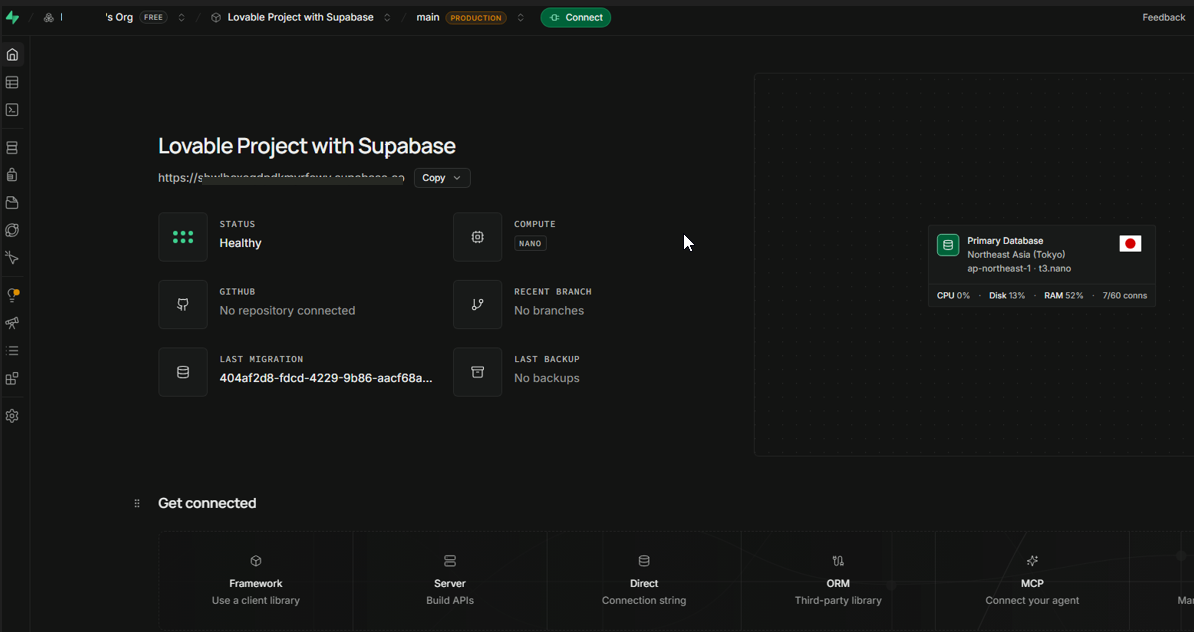
On Lovable Cloud the picture is different. The Postgres instance is “provisioned and managed entirely by Lovable,” such projects “don’t appear on your Supabase Dashboard,” “Service role and API keys are not accessible for Lovable Cloud–managed projects,” and “External connections are not supported when your project runs on Lovable Cloud” (Supabase docs). Four separate doors, all closed from the same side.
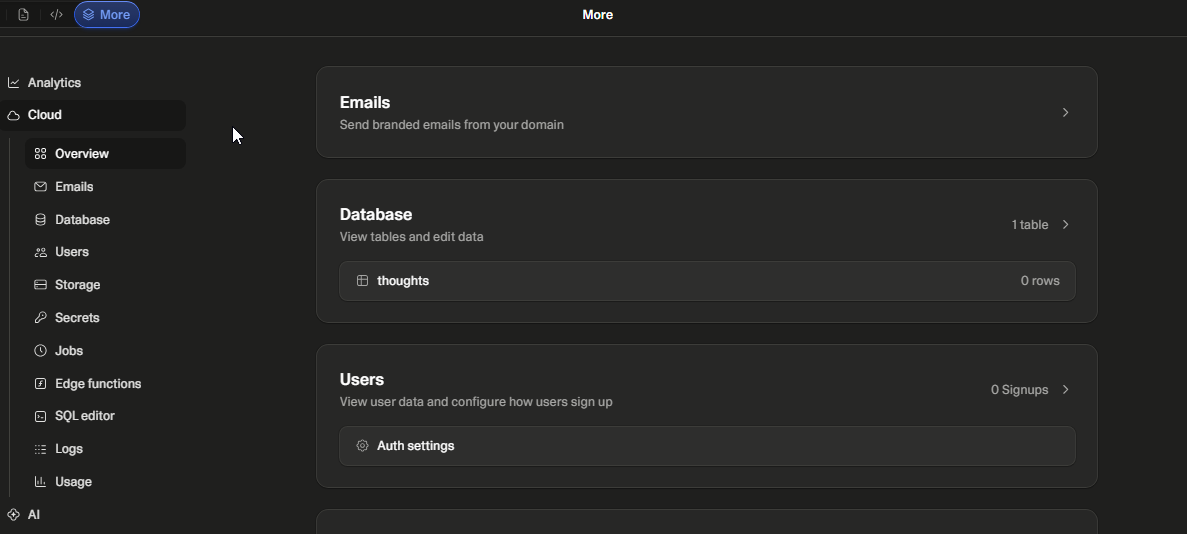
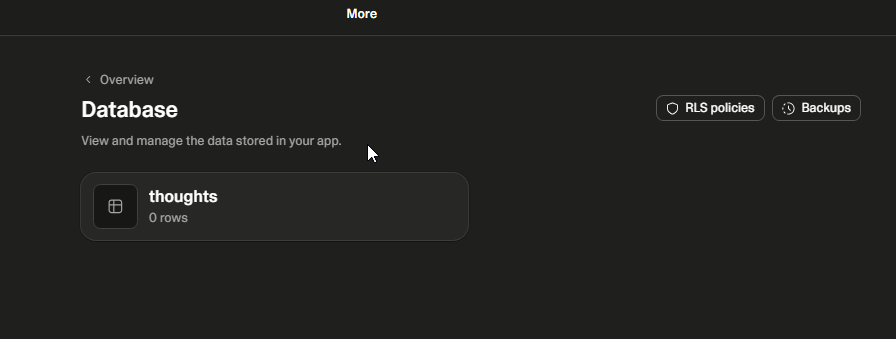
So the question for this layer is whether you can open a dashboard for this database with your own login.
Auth
Your users are rows too, but they live in the auth schema, and that schema is not in the repository. It is also excluded by default from a standard dump, which is the part that surprises people who assumed a backup covered it. The Supabase CLI reference says supabase db dump “runs pg_dump in a container with additional flags to exclude Supabase managed schemas. The ignored schemas include auth, storage, and those created by extensions” (Supabase CLI reference).
Moving accounts between projects is therefore not a side effect of copying tables. Supabase does not “provide a one-size-fits-all script for migrating only the auth schema,” and the work sits inside its general migration guide rather than in a single command. One caveat is worth knowing before you start rather than after: “if the JWT secret is different in the new project, existing tokens will become invalid, and users will be required to log in again” (Supabase docs). Everyone gets logged out, at once, on a day you chose without realising you were choosing it.
The failure we’ve seen when this is missed is quieter than that, though: rows referencing user IDs that no longer resolve to anyone. The app keeps running. The data stops meaning what it used to mean.
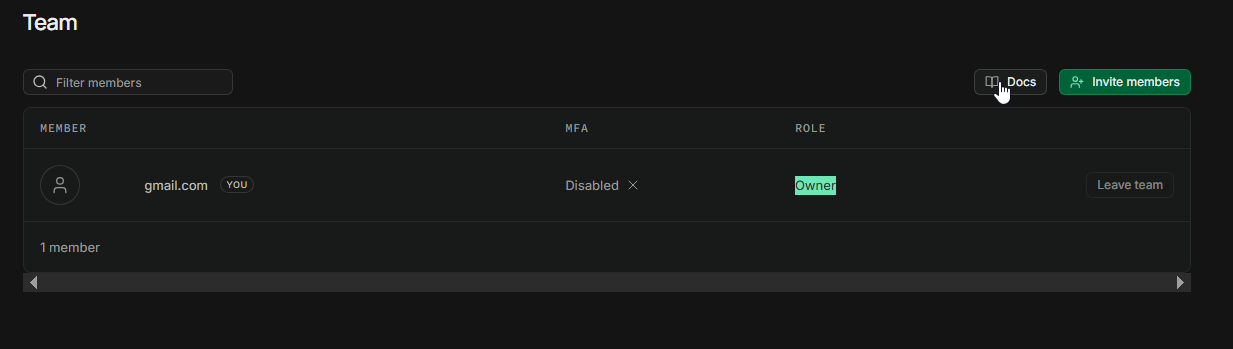
Could you produce your user list from something you hold?
Storage
A database backup does not cover your uploads. Supabase is direct about it: “Database backups do not include objects you store via the Storage API, as the database only includes metadata about these objects” (Supabase docs). Restore one and you get rows pointing at files that are not there.
Avatars, invoices and customer exports tend to be a product’s most visible content and the least likely to sit in anything you call a backup. So: where is the second copy?
Secrets
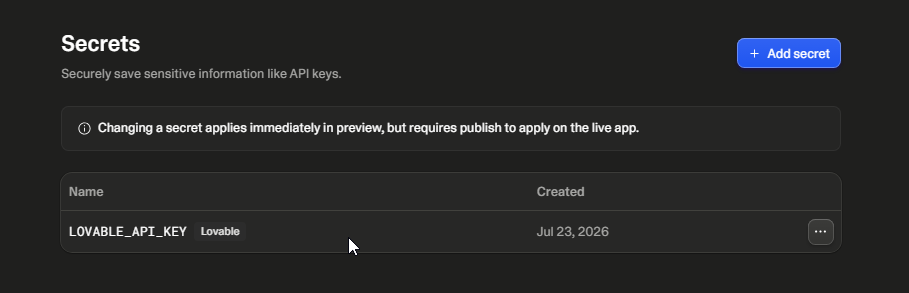
Lovable’s secrets are “encrypted, injected into your Edge Functions automatically, and never reach the browser.” They never appear in your code or repository, and they are write-only, because “after you save a secret, its value can never be viewed again in Lovable, only replaced or deleted” (Lovable docs). Their absence from the repo is deliberate, and it is a feature. The committed .env is not an exception to it either, since Lovable needs that file committed so build-time VITE_* values exist for previews and published builds, and those values are public by design.
The practical consequence is that you cannot read your own credentials back, only replace them. Two patterns get attractive at that point, and both show up in projects that arrive here: routing secrets out through a temporary public endpoint, and pasting a service-role key into client code.
The second one is worth spelling out, because it does not look dangerous in an editor. A service-role key is a server-side credential that row-level security, the Postgres rules deciding which rows a given user can see, does not restrict at all. It “uses the BYPASSRLS attribute, skipping any and all Row Level Security policies you attach,” and Supabase’s instruction is to use it “only … in backend components of your app” (Supabase docs). Anything shipped to a browser is readable by everyone who loads the page, which means a key placed there is not partially exposed. It is published. We do not publish either procedure here; the supported path is a project you administer, and detection is row 5 of the check below.
Can you list and rotate every secret this app uses?
Domain
Registrar control is often genuinely yours, since the account is in your name. What the name resolves to is a separate fact: an A record pointing at Lovable’s edge, plus a _lovable TXT record you added at your registrar to verify the domain, or a CNAME Lovable provides if you front the site with a CDN or reverse proxy. Lovable adds that “your custom domain won’t serve any content until you publish your project” (Lovable docs).
Your control here is complete, but you can only exercise it toward somewhere that already serves the app. Repoint DNS before that exists and you take the site down rather than move it. The question is only whether you hold the registrar login.
Deploy
This layer is invisible while it works, so it gets forgotten. The site your customers load is Lovable’s build and Lovable’s hosting, and the repository contains application source, not the pipeline that produces that build. A fresh clone deploys nothing until you add something that does.
Lovable’s ownership page is explicit about the shape of that work. Applications “rely on Supabase-specific services such as authentication, storage, realtime, and edge functions,” and moving to plain PostgreSQL or another provider “would require implementing equivalent authentication, storage, and edge services.” That sentence is scoped to replacing the managed backend rather than the build pipeline, but it prices the same move, because what Lovable runs for you today is what becomes yours to run.
What would rebuild and publish the site if Lovable did not?
The seven-layer ownership check
Seven items, one per layer, in the counting order above: where to look, what “yours” looks like, what “still Lovable’s” looks like. All of it is a browser job.
| # | Layer | Where to look | Reads as yours | Reads as still Lovable’s | How we know |
|---|---|---|---|---|---|
| 1 | Code | The repo page on GitHub | Source, config and a committed .env, in a repo you administer |
Only a downloaded ZIP, or an org you cannot administer | Lovable’s GitHub docs |
| 2 | Database | The Cloud icon in your project editor’s top bar | The Supabase icon, your Supabase project name, and links out to the Supabase Dashboard | Screens that manage database tables and users from inside Lovable (how to tell) | Both backends, in Database above |
| 3 | Auth | Wherever your user list appears | A Supabase Auth section you reach with your own login | A user list that exists only inside Lovable | Owner role, in Auth above |
| 4 | Storage | Your file listing, plus your own backups | You can list objects with your own login; a copy exists off-platform | Files visible only through Lovable, no second copy | Supabase backup docs |
| 5 | Secrets | GitHub’s in-repo search for service_role; then your browser’s DevTools search across every loaded source on the live site |
No hit in either place; you can rotate secrets in an account you administer | A hit, meaning a key that should never be client-side is there, so rotate it | Write-only panel, in Secrets above |
| 6 | Domain | Your registrar’s DNS panel | You can log in and edit the records yourself | You cannot log in, or someone else added them | Lovable custom-domain docs |
| 7 | Deploy | What happens when you ship a change | A pipeline in your own hosting or CI builds from the repo | Publishing happens inside Lovable | Lovable ownership docs |
The last column is how this article knows the reading, not a status for your project. Database is shown on both backend types. Auth shows the Owner role that makes a user export possible; the Users list is the next screen on that same login. Secrets shows the write-only panel. Code, storage, domain and deploy follow vendor documentation, checked on 2026-08-14. Run the other two columns against your own screens.
Row 5 has two edges worth stating, because both produce a clean-looking miss. Search the loaded sources rather than view-source, since a key compiled into a bundled .js asset never appears in the page’s HTML. And in-repo search covers the current branch, not the history behind it, so a key committed and later removed still needs rotating. A hit means one exposure exists. A miss means it is absent from the places you looked, not that the app is secure. Both lookups are read-only, and both are on a project you administer.
This check tells you which layers you control on the day you run it. It does not tell you that moving the ones you don’t will be uneventful. Knowing where a layer lives is the precondition for moving it, not the move itself.
Blast radius: the check reports location, not health. It does not tell you whether the data is correct, whether your backups restore, or whether your access rules are sound.
What actually closes the gap, layer by layer
The counting order and the moving order are not the same, because dependencies decide the second one.
The backend goes first, since everything else addresses it, and the supported route is a project you administer, either from the start or via the documented migration. Auth users follow once that destination database exists. That is a documented job in its own right, and the one that ends with everyone logged out if the JWT secret changes. Storage objects are next, mostly a volume-and-time problem, with the wrinkle that the metadata rows still have to match after the objects land.
Secrets are different in kind. Nothing gets copied, because you cannot read the old values back, so each one is reissued at its source and inventoried on the way. Deploy is also new work rather than a transfer: something has to build and serve what Lovable was serving, and until it does there is nowhere to point.
Which is why DNS goes last. Repointing the domain before a destination serves the app takes the site down instead of moving it.
Each layer is portable, but the work differs by layer. Where cutover order and launch blockers have to be settled before real users are affected, that is a production readiness audit rather than a migration task. We are not attaching hours, because the numbers depend on your data volume and integrations.
How we’d approach this
If you brought this to the desk, we would run the same seven-layer separation against the actual project: which backend the app talks to, where auth identities live, what is in storage that is not in the database, which secrets exist and who can rotate them, where DNS points, and what builds the site your users load. The output is a written map of what is yours today, what is not, and what each layer would cost to move, in dependency order.
Out of scope: we do not perform the migration inside the assessment, and rebuilding or re-platforming the app is development work rather than assessment, outside what this desk takes on. This is also not a security review, and the service-role-key material above is detection and remediation only.
What you actually know now
The export was worth doing, and it did what it said. It moved one layer of seven, completely.
An export does not confer ownership as a single status. There are seven separate answers, and today you can name all seven for your own project. Something built fast can still be production; the question was never whether it works today, but who holds each layer on the day one of them has to change.
These are answers about today, though. A plan change or a new integration can re-open a layer you had marked as yours, which makes this a check you re-run rather than complete.
If you want that map for your own project rather than a general list, the Production Independence Assessment documents which of the seven layers you control today and what each one would take to move, with scope and price agreed before anything in production changes.