You open a Supabase project, maybe one you just took over from Lovable Cloud, maybe one whose schema you are diffing against its own migration files, and you find two objects nobody on your team wrote: a function called public.rls_auto_enable() and an event trigger called ensure_rls.
That pair is not malware, and it is not a Lovable backdoor. It is a Supabase feature that someone opted into. It does change how every new table in public behaves, though, and in the project we looked at it was nowhere in the migration history, so a project rebuilt from those migrations starts without it. On 2026-09-30 we read the function definition in a Lovable-connected project, compared it against a default project, and created tables to watch the trigger fire.
Every platform claim below was checked against Supabase documentation on 2026-09-30. App Rescue Desk is independent and is not affiliated with Lovable or Supabase.
TL;DR
rls_auto_enable()is aSECURITY DEFINERfunction run by theensure_rlsevent trigger afterCREATE TABLE,CREATE TABLE ASandSELECT INTO. Supabase publishes it in its event triggers guide, and the new-project form offers it as Enable automatic RLS.- It turns RLS on for new tables in
publiconly. It writes no policies. In our lab, a newpublictable got RLS with zero policies:anonsaw 0 of 1 rows and its insert failed withnew row violates row-level security policy. - It leaves existing tables alone and skips every schema except
public. Each table it considers gets one line in the Postgres logs. - In our project it was not in the migration history, so any project rebuilt from those migrations starts without it, including the Supabase project you move to when you leave Lovable Cloud. The same migration then behaves differently in the two places.
- Most teams should keep it and write it into a migration, so that every environment behaves the same way. Drop it only deliberately, through a migration, and only after you know what relies on it.
What rls_auto_enable and the ensure_rls event trigger look like in your database
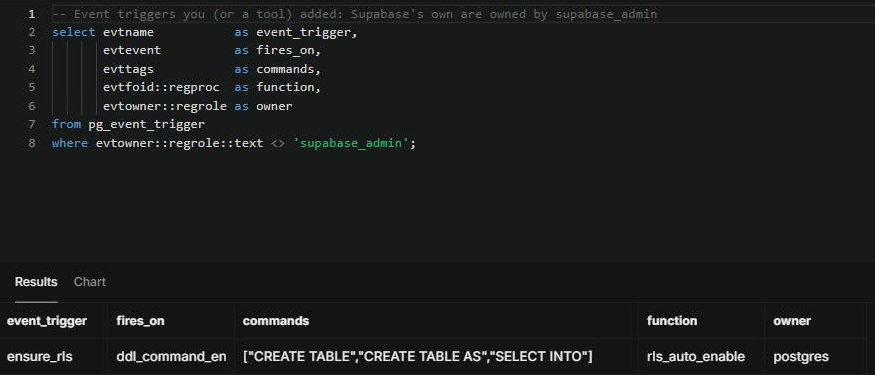
Supabase’s own event triggers are owned by supabase_admin. Anything owned by a different role was added by you, a teammate, or a tool you ran. This query lists them:
select evtname           as event_trigger,
       evtevent          as fires_on,
       evttags           as commands,
       evtfoid::regproc  as function,
       evtowner::regrole as owner
from pg_event_trigger
where evtowner::regrole::text <> 'supabase_admin';
In a Lovable-connected project, which we will call Project B, the query returned one row: ensure_rls, firing on ddl_command_end for CREATE TABLE, CREATE TABLE AS and SELECT INTO, calling rls_auto_enable, owned by postgres.
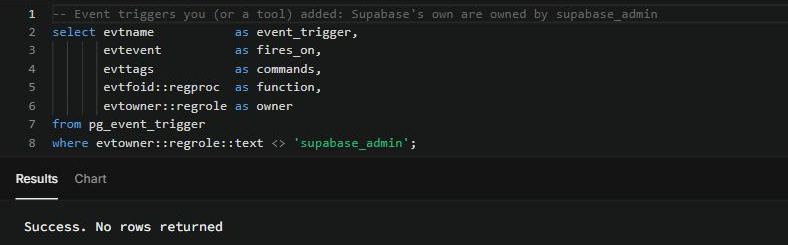
The same query in a project created with the dashboard defaults, Project A, returned nothing.
pg_get_functiondef('public.rls_auto_enable'::regproc) returned this definition in Project B:
CREATE OR REPLACE FUNCTION public.rls_auto_enable()
 RETURNS event_trigger
 LANGUAGE plpgsql
 SECURITY DEFINER
 SET search_path TO 'pg_catalog'
AS $function$
DECLARE
  cmd record;
BEGIN
  FOR cmd IN
    SELECT *
    FROM pg_event_trigger_ddl_commands()
    WHERE command_tag IN ('CREATE TABLE', 'CREATE TABLE AS', 'SELECT INTO')
      AND object_type IN ('table','partitioned table')
  LOOP
     IF cmd.schema_name IS NOT NULL AND cmd.schema_name IN ('public') AND cmd.schema_name NOT IN ('pg_catalog','information_schema') AND cmd.schema_name NOT LIKE 'pg_toast%' AND cmd.schema_name NOT LIKE 'pg_temp%' THEN
      BEGIN
        EXECUTE format('alter table if exists %s enable row level security', cmd.object_identity);
        RAISE LOG 'rls_auto_enable: enabled RLS on %', cmd.object_identity;
      EXCEPTION
        WHEN OTHERS THEN
          RAISE LOG 'rls_auto_enable: failed to enable RLS on %', cmd.object_identity;
      END;
     ELSE
        RAISE LOG 'rls_auto_enable: skip % (either system schema or not in enforced list: %.)', cmd.object_identity, cmd.schema_name;
     END IF;
  END LOOP;
END;
$function$
Four details in that body matter:
- The enforced schema list is
('public'). A table created in any other schema is skipped, and the skip is logged. - It only reacts to
CREATE TABLE,CREATE TABLE ASandSELECT INTO, so it ignores tables that already existed. It also does not stop anyone from runningalter table ... disable row level securityafterwards. - It runs
enable row level securityand nothing else. It creates no policies. - If enabling RLS fails, the exception handler logs
failed to enable RLS on ...and theCREATE TABLEstill succeeds. The table then exists without RLS, and only the log says so.
Is rls_auto_enable a hack or a Lovable backdoor? Why the first guesses are wrong
“Someone tampered with the database, drop it.” The function is the one Supabase publishes in its event triggers guide. On 2026-09-29 the dashboard offered it as Enable automatic RLS, unticked by default. The screenshot is in what breaks after you migrate from Lovable. Dropping it before you know why it is there means future public tables start without RLS, and in a project that grants the API roles access to new tables, that makes them readable by anyone holding the publishable key.
“Lovable installed it.” We found it in a Lovable-connected project and not in a default one. That is a sample of one project on each side, and the database records neither who ticked the box nor who ran the SQL. We could not tell whether it was chosen at creation or added later, so do not assume either.
“It protects all my tables.” It only acts on tables created in public after it was installed. Tables that existed before keep whatever RLS state they had.
“RLS is on, so the table is secure.” RLS on with no policies means anon and authenticated see nothing and can write nothing (the service role still bypasses RLS). That is safe, but it is also why a feature that worked in one project comes back empty in another.
What rls_auto_enable does to a new table: lab results
In Project B we created the same table twice, once in public and once in a schema called rls_lab, without writing enable row level security anywhere:
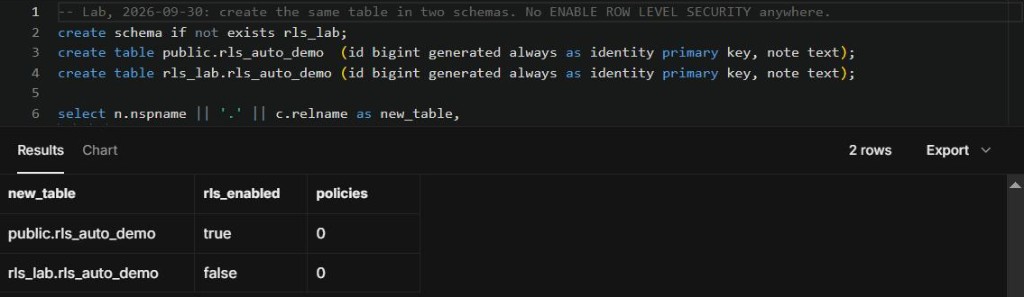
The Postgres logs recorded both decisions within the same second:

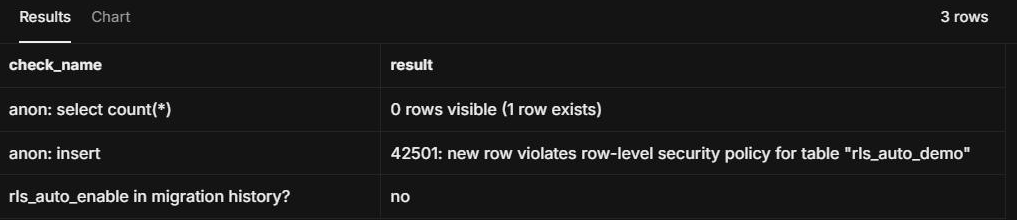
Then we inserted one row as postgres and queried the table as anon, the role the Data API uses for requests that carry no user session:
| New table | What happened |
|---|---|
Created in public |
RLS enabled, 0 policies, logged enabled RLS on public.rls_auto_demo |
| Created in another schema | RLS left off, logged skip rls_lab.rls_auto_demo |
Read as anon |
0 rows visible, 1 row exists, no error |
Insert as anon |
42501: new row violates row-level security policy for table "rls_auto_demo" |
| Migration history | No entry mentions rls_auto_enable |
Reads are the dangerous half. An app that lists records gets an empty array and no error, the same symptom described in RLS returned zero rows, but the data may still exist. Writes at least fail loudly, with 42501.
How to check who enabled rls_auto_enable and which tables it touched
Run these read-only checks on the project where you found it, and on any project you are moving to.
-
Confirm the trigger and its owner. Use the
pg_event_triggerquery above.ensure_rlsowned bypostgresrather thansupabase_adminmeans it isn’t one of Supabase’s internal triggers; it was opted into. -
Check the migration history.
select version, name
from supabase_migrations.schema_migrations
where array_to_string(statements, ' ') ilike '%rls_auto_enable%';
No rows means it was added outside your migrations: ticked at project creation, run in the SQL Editor, or applied by a tool. The database doesn’t record which. Ask whoever created the project before you change it.
-
Find the tables it touched. Search the Postgres logs for
rls_auto_enable. Each table gets one line:enabled RLS on,skip, orfailed to enable RLS on. How far back you can see depends on your plan’s log retention. Afailedline is the one to act on first, because that table was created without RLS. -
List the tables it left without policies.
select c.relname as table_name
from pg_class c
join pg_namespace n on n.oid = c.relnamespace
where n.nspname = 'public'
  and c.relkind in ('r', 'p')
  and c.relrowsecurity
  and not exists (select 1 from pg_policies p
                  where p.schemaname = 'public' and p.tablename = c.relname)
order by 1;
Every table in that list denies anon and authenticated completely. If the app is supposed to read or write one of them, write the policies. If none of them should be reachable from the API, the list is telling you the trigger did its job.
Keep or drop rls_auto_enable: how to decide
| Your situation | Decision |
|---|---|
| Your team writes policies in the same migration that creates each table | Keep it. It catches the new table that ships before anyone remembers to enable RLS |
| Tables are created from the dashboard or by an AI builder, and some came back empty | Keep it, and add the missing policies. Dropping it makes future tables start open instead |
| Only some environments have it | Make it consistent. Either add it to your migrations or remove it everywhere |
| You enable RLS explicitly in every migration and want no hidden DDL behavior | Dropping it is reasonable, through a migration, after the checks above |
Keeping it means writing it down. Put the pg_get_functiondef output and the event trigger into a migration, so that every rebuilt project has them:
-- migration: record rls_auto_enable so every environment behaves the same
-- (function body: paste the output of pg_get_functiondef from your project)
create event trigger ensure_rls
  on ddl_command_end
  when tag in ('CREATE TABLE', 'CREATE TABLE AS', 'SELECT INTO')
  execute function public.rls_auto_enable();
If you decide to remove it, do that in a migration too:
drop event trigger if exists ensure_rls;
drop function if exists public.rls_auto_enable();
We did not run either of these in the lab project. Test them on a branch or a local copy first. After removing the trigger, make sure every create table in your migrations is followed by enable row level security and the policies that table needs.
Keep rls_auto_enable consistent across projects and migrations
- Treat
ensure_rlsas schema. If it exists in production, it should exist in your migration files. - Ship policies in the same migration that creates the table, covering every command the app uses. The trigger turns RLS on. It does not decide who may read.
- After any project move, run the
pg_event_triggerquery in the old and new project and compare. Adb diffagainst the old project should also surface it, as it did in when to migrate away from Lovable. - Check the Postgres logs for
failed to enable RLS onafter schema changes.
When finding rls_auto_enable means a bigger migration check
Finding one object you didn’t write is usually a sign there are others. Look wider if:
- You found it while comparing an old Lovable Cloud project with a new Supabase project, and the new one doesn’t have it.
- Features that worked before the move now return empty lists, or inserts fail with
42501. db diffshows functions, grants or extensions that aren’t in your migrations.- Nobody on the team knows how the project was created or which options were ticked.
At that point the question isn’t this one trigger. It is which parts of the old project live outside your migrations and didn’t come across. What breaks after you migrate from Lovable walks through the four layers a green deploy doesn’t check.
Summary: rls_auto_enable turns RLS on, and nothing else
rls_auto_enable is an opt-in Supabase function that enables RLS on new public tables through the ensure_rls event trigger. It writes no policies and leaves existing tables alone, and unless you put it in a migration yourself, it is not in your migration history. Find it, read the logs for the tables it touched, then decide deliberately whether every environment should have it.
If you found it while moving off Lovable Cloud and want to know what else lives outside your migrations, our Lovable migration service starts with a read-only assessment. We compare the old and new projects layer by layer and quote any migration work in writing before anything changes. If it is one table or one error you need fixed, the bug fixing service takes it on its own.