Supabase’s changelog says projects created from 2026-05-30 no longer grant the Data API access to new public tables. On 2026-09-29 we created one from the dashboard and the grants were still there, because the form ticks them by default.
If you migrate from Lovable to your own Supabase project, that gap decides whether a migrated table comes back empty, returns 42501, or is readable by anyone holding the publishable key. It is one of four layers a green deploy does not check, and this post takes them in the order they fail.
Every platform claim below was checked against Lovable, Supabase, Vite, Vercel and Netlify documentation on 2026-09-29. App Rescue Desk is independent and is not affiliated with Lovable or Supabase.
TL;DR
A green build proves the code compiled. It does not prove that configuration, email delivery or live database state moved. After you migrate from Lovable, run four checks in this order:
- Project ref: does the live app call the new Supabase project, not the old one?
- Build-time values: did you deploy a fresh build after changing environment variables?
- Auth email: do the Auth logs show
email_address_not_authorizedorover_email_send_rate_limit? Both mean the built-in email provider, not your code. - Database drift: run
supabase db diff --linkedagainst the old project, then the new one. Then check each new table. An empty page points at RLS or missing rows.42501points at grants. A table with grants but no RLS is readable by anyone.
Deadline: Supabase has announced that from October 30, 2026, new public tables in existing projects stop getting Data API grants automatically. Check each table rather than relying on the date.
Stop: if check 4 shows a table with user data that anon can read, stop: that is a data exposure, not a migration step.
What you see after the move
Nothing fails at build time. The failures appear at runtime.
Confirmation or reset emails don’t arrive, and the Auth logs show one of these error codes:
email_address_not_authorizedover_email_send_rate_limitA page is empty, or the network tab shows:
"code": "42501", "message": "permission denied for table your_table"A feature may also still be calling the old project. The same symptom can come from different layers, so the sections below separate them.
What everyone checks first, and why it is the wrong layer
Re-syncing GitHub. Exporting to GitHub doesn’t move the app. Git sync moves code and migration files, not data or dashboard settings.
Changing an environment variable and rechecking the same deployment. Build-time values live in the deployed files. Nothing changes until a fresh build runs.
Debugging signup code. If the built-in email provider refuses to send, no change to your form fixes it.
Reading unfamiliar db diff output as tampering. A diff is a comparison, not a security verdict.
Layer 1: Why is the migrated app still showing old data or signing users out?
What surfaces. A feature reflects the old project, or the new project has none of the old runtime state. Users may be signed out.
Why. Lovable’s Git sync documentation says the sync never moves the data inside your database. Its Supabase guide describes linking a new project and pushing supabase/migrations/. That recreates schema changes made through migrations. It does not move users, data, auth settings or storage.
Changes made in the dashboard or SQL editor may not be in those files at all. Code is only one of the six separate migrations that leaving Lovable actually is.
A new project also has a different JWT secret, the key that signs login sessions, so existing sessions are not valid in the new project.
How to confirm. Write down three project refs: the one the deployment calls, the old one and the new one. A mismatch is a stale project ref. A match proves only where requests go.
The built JavaScript is the quickest place to see which project a deployment was built against: it contains the Supabase host as a plain string. The reproduction in Layer 2 shows what that looks like.
Layer 2: Why didn’t changing the environment variable fix it?
What surfaces. Requests go to the old Supabase host, or a feature fails quietly because a value was empty at build time.
Why. Vite replaces VITE_ environment variables with literal values at build time. On Vercel, “any change you make to environment variables are not applied to previous deployments, they only apply to new deployments” (checked 2026-09-29). Netlify likewise needs a fresh build and deploy. That is why an environment variable change does not reach production until a fresh build runs.
How to confirm. On the live site, open the network tab and note which Supabase host requests go to. The old host means a stale build. You can also search the built JavaScript for supabase.co; a search that finds nothing is weaker evidence, since the URL may be assembled at runtime or sit in a chunk you did not open.
What we reproduced. On 2026-09-29 we built a minimal Vite 8 app with the Supabase URL in .env.production, then searched the built JavaScript for it. Step 2 is the equivalent of changing the value in your hosting dashboard and reloading the same deployment:
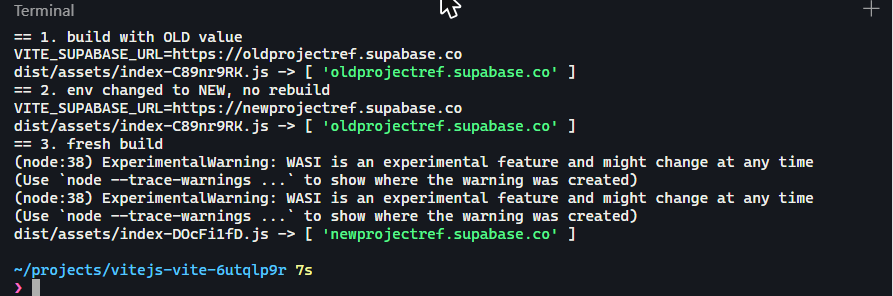
== 1. build with OLD value
dist/assets/index-C89nr9RK.js -> [ 'oldprojectref.supabase.co' ]
== 2. env changed to NEW, no rebuild
dist/assets/index-C89nr9RK.js -> [ 'oldprojectref.supabase.co' ]
== 3. fresh build
dist/assets/index-DOcFi1fD.js -> [ 'newprojectref.supabase.co' ]
The file name stays the same in step 2 because nothing was rebuilt; the old host is still in it. Only the fresh build, with a new file hash, contains the new value.
A fresh build fixes the value. It moves no data, users or email settings.
Layer 3: Why do Supabase auth emails stop after migrating from Lovable?
What surfaces. Real users get no confirmation or reset email, though signup reaches Supabase Auth.
Why. As of 2026-09, Supabase’s built-in provider sends only to pre-authorized team addresses and is capped at 2 emails per hour. That is the Supabase email rate limit on a fresh project, set for testing rather than real users.
email_address_not_authorized vs over_email_send_rate_limit
Because non-team addresses are refused outright, a real user’s first failure is likely email_address_not_authorized. over_email_send_rate_limit is a different condition: the hourly cap was hit. Neither is a fault in your code or in Lovable.
How to confirm. In the Auth logs, match error.code to the two codes. Check whether the recipient is a team member and which provider the project uses, before touching signup code.
What closes it. Configure custom SMTP and test with a non-production account. Supabase documents a starting limit of 30 emails per hour after that (as of 2026-09).
Layer 4: Why are pages empty, returning 42501, or showing data they shouldn’t?
What surfaces. A page returns no rows, or the API returns 42501. There is a third outcome nobody reports, because nothing breaks: a table anyone with the publishable key can read. Each of the three has a different cause.
Why. A database built from migration files contains what those files contain. A dashboard policy or SQL-editor function may be missing.
An empty result commonly has one of two causes: the rows never moved, or row-level security (RLS, the Postgres rules that decide which rows a request sees) hides them. Per Supabase’s RLS guide, with RLS on and no policies, the API returns no data for a publishable key. The empty-result case is the same check as the query came back empty, but the data may still exist.
42501 points at grants. Supabase’s changelog says projects created from 2026-05-30 no longer auto-grant anon, authenticated and service_role on new public tables for the Data API. Migrations written for an older project may rely on those grants. In our test below, though, the new-project form still offered auto-grant as a choice and had it ticked, so the behavior you get depends on how the project was created.
What changes on October 30, 2026: tables not exposed to the Data API automatically
Supabase has announced that the no-auto-grant behavior reaches existing projects on 2026-10-30. Per its discussion of the change, tables that already exist keep their current grants. Any new public table created after that date is meant to need explicit grants before the Data API can reach it.
For a Lovable app this matters in two places:
- New features. A project that no longer auto-grants needs a grant step for every new table. Without it, reads and writes fail with
42501even though RLS and policies look correct. - Migrations replayed into a new project. Every table the migrations create is a new table. If the migration files have no
grantstatements and the new project does not auto-grant, it will not expose them.
Given what we saw below, treat the date as a reason to check, not as a guarantee of either behavior.
One new table, three outcomes: what the Supabase defaults produce
We reproduced this on 2026-09-29 in two ARD lab projects.
Project A: a brand-new project with dashboard defaults. Created from the Supabase dashboard with nothing changed. The Security section of the Supabase new-project form had Automatically expose new tables ticked, with Supabase’s own note recommending you turn it off, and Enable automatic RLS unticked.
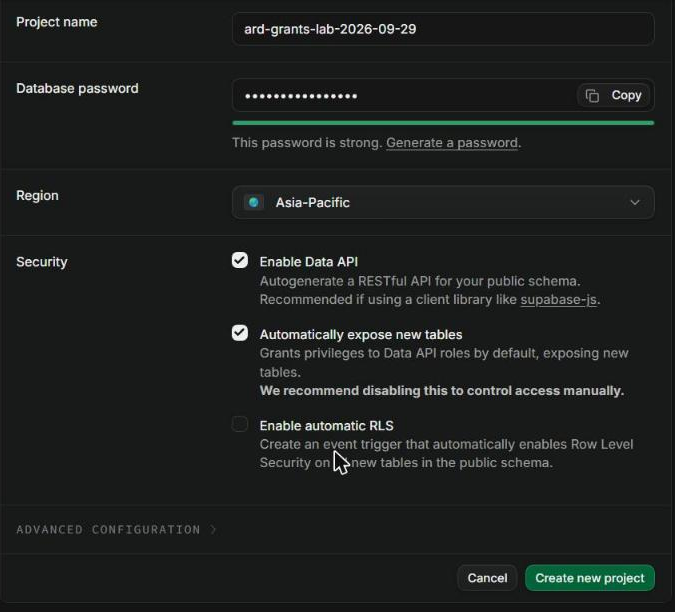
Creating a table in the SQL editor raised a warning that it would be created without RLS. We chose to run it anyway, to see what the defaults produce.
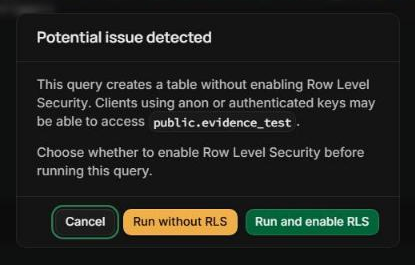
create table public.evidence_test (id bigint generated always as identity primary key, note text);
insert into public.evidence_test (note) values ('row exists');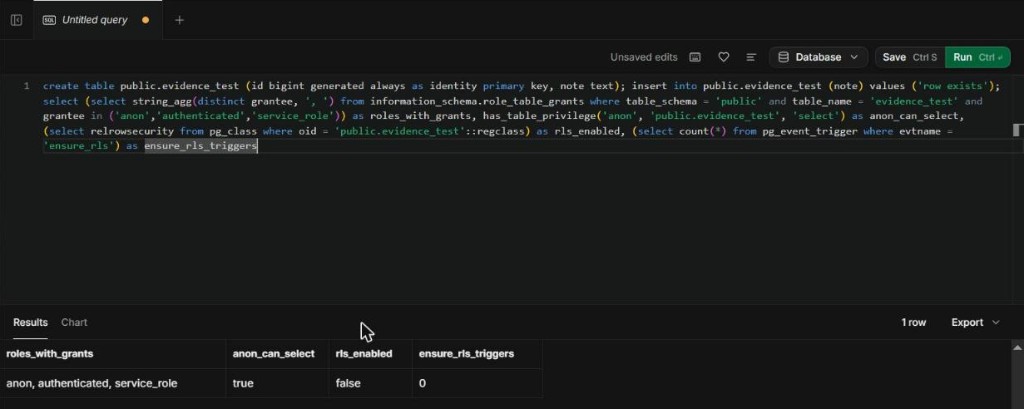
| Check | Project A result |
|---|---|
| Roles with grants on the new table | anon, authenticated, service_role |
has_table_privilege('anon', …, 'select') |
true |
| RLS enabled | false |
ensure_rls event trigger |
none |
Reading as anon returned the row:
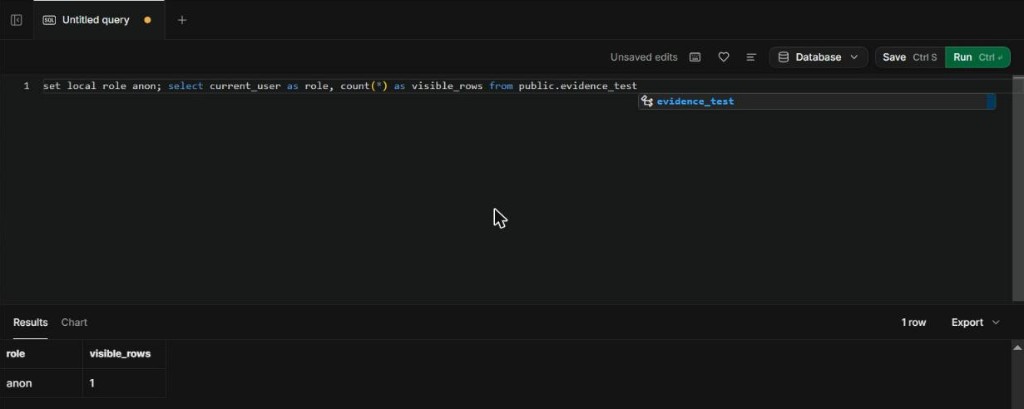
The read succeeds. Anyone holding the publishable key can read the table, and nothing in the app tells you.
If
anon_granted = trueandrls_on = falseon any table holding user data, treat it as an incident. Check every table in both projects before changing anything; the assessment does exactly that.
Project B: an older Lovable-connected project with automatic RLS. We paused and restored it the same day before the test. The same create table gave grants to all three roles, RLS switched on by the ensure_rls event trigger, and zero policies. Reading as anon:
role | visible_rows
anon | 0
The row exists; the API role cannot see it. In an app, that is an empty page with a clean network response.
Either project, grant revoked. We revoked anon’s grant and read again:
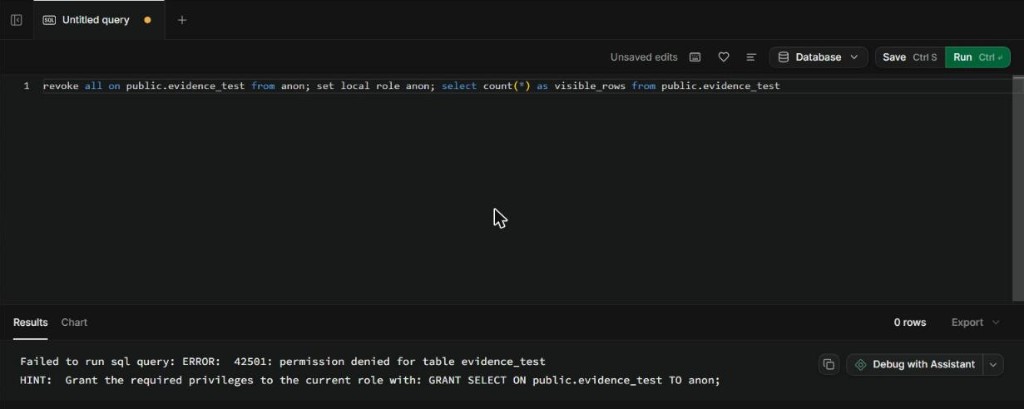
We dropped the test tables afterwards.
| State of the new table | What the app sees |
|---|---|
| Grant, RLS off | Rows returned to anyone with the publishable key |
| Grant, RLS on, no matching policy | Empty result, no error |
| No grant | 42501 permission denied for table |
What this shows: the table’s grants and RLS state decide the symptom, and those depend on how the project was created and configured. Neither the changelog nor the project’s age tells you which state you have, so check the table itself.
How to confirm. One read-only query per table:
select has_table_privilege('anon', 'public.your_table', 'select') as anon_granted,
       relrowsecurity as rls_on
from pg_class where oid = 'public.your_table'::regclass;
anon_granted = false means grants (42501). true with rls_on = false means the table is exposed. true with rls_on = true and no rows means policies or missing data.
Adding a policy or grant changes who can read or write. Review it as an access-control change.
Running supabase db diff after you migrate: functions you never wrote, policies that did not come
supabase db diff compares a live database against a shadow database built from your migration files. It defaults to your local database; --linked targets the linked remote project. It needs Docker. Customizations on managed schemas, such as a trigger on auth.users, are included.
Run it in both directions against the same migrations. The table covers all four layers.
| Layer | What surfaces | Read-only confirmation | What it does and doesn’t prove |
|---|---|---|---|
| 1. Code vs. running app | Old data, signed-out users | Compare the deployment’s project ref with the old and new refs | Proves where requests go, not that data moved |
| 2. Build-time values | Requests to the old host | Network tab on the live site | Old host = stale build; nothing found is weak evidence |
| 3. Auth email | No confirmation email | Auth logs: match error.code; check provider |
Identifies the provider limit; delivery needs a real test |
| 4. Database drift | Empty pages, 42501 |
db diff --linked against the old project, then the new one |
Old: objects never captured in migrations. New: state you didn’t write. Neither compares rows |
supabase link --project-ref <old-project-ref>
supabase db diff --linked
Then repeat with <new-project-ref>.
What rls_auto_enable is
People report finding a function rls_auto_enable() with an event trigger ensure_rls. Supabase publishes it in its event-triggers guide. It is SECURITY DEFINER: it runs with its owner’s rights, not the caller’s. It enables RLS on tables created after the trigger is installed; existing tables still need RLS enabled separately. The keep-or-drop checks are in rls_auto_enable: what it does and whether to keep it.
It is opt-in. On 2026-09-29 the dashboard’s new-project form offered it as Enable automatic RLS, unticked by default, and the default project (A) above had no ensure_rls trigger. Project B had it:
| Property | Value |
|---|---|
| Function | public.rls_auto_enable, owner postgres, SECURITY DEFINER |
| Event trigger | ensure_rls, fires on ddl_command_end for CREATE TABLE, CREATE TABLE AS, SELECT INTO |
In supabase_migrations.schema_migrations |
No |
That last row matters: because it is not in the migration history, a database rebuilt from migration files will not have it, and a db diff against the old project should surface it as drift.
So if you find it, someone opted in: at project creation, later in the dashboard, or a tool acting on your behalf. The database does not record which; we could not tell for Project B. If it is present and you did not author it, identify how it got there before changing it.
What to do with objects you didn’t write
Don’t drop them. Find out where each one came from. Review the Security Advisor findings and the execute grants on each function, then restrict execution to the roles that need it. Record the objects you keep in a reviewed migration. The same goes for RLS policies that hide rows without an error.
A clean db diff tells you the new database matches your migration files. It does not tell you your migration files matched the database your users were actually using.
How to fix it safely, in order
- Preserve. Keep the old project running and back it up. Auth users and Storage move separately; a database dump excludes them.
- Configuration. Correct environment values, confirm the project ref, deploy a fresh build.
- Email. Configure custom SMTP; test with a non-production account.
- Database. Review missing RLS policies, grants, functions and triggers. Record approved ones as migrations. Never apply an unfamiliar diff wholesale.
- Re-verify. Re-run the four checks and test signed-in reads and writes.
Rollback point: until users write to the new project, the old one is your rollback. After that, rollback may be partial.
How to stop the same drift recurring
Make reviewed migrations the record for schema, policies, grants, functions and triggers. When a dashboard change is unavoidable, capture it in the repository before the next migration.
Treat a changed build-time value as unfinished until a new deployment is checked. Keep an ownership inventory: SMTP, Auth settings, Storage, edge-function secrets, project refs. Use a read-only diff plus one signed-in data check as a release gate. It costs review time, and it stops the app depending on undocumented dashboard state.
When this is bigger than it looks
The four checks don’t cover Storage objects, edge-function secrets, migrated Auth users or transformed data. If paying users already write to the new project, self-repair is riskier because rollback is no longer clean. If you haven’t committed to the move yet and the trigger was one feature that stopped working, compare what a Lovable app fix costs against a migration before you start.
If you brought this to the desk, we would start with a read-only comparison of what the old project ran against what the new one has. That is the production-independence assessment. It maps build-time configuration, Auth delivery, database objects and grants, Storage, edge functions and repository ownership against what actually moved. The output is a written list: what moved, what didn’t, and the order for the rest. Scope and price are agreed before any production change.
Stop and get a second pair of eyes if:
db diffagainst the old project shows policies or functions nobody can attribute- paying users have already written to the new project, so rollback is no longer clean
- any table returns rows to
anonthat it shouldn’t - Auth users, Storage or edge-function secrets still have to move
We don’t rebuild the app or run penetration tests; the assessment tells you what’s left to move and in what order.
FAQ
Does exporting a Lovable project to GitHub move my Supabase data and users?
No. Git sync moves code and migration files. Data, Auth users, Auth settings, Storage and dashboard-only changes stay in the original Supabase project and move separately.
Why do Supabase auth emails stop after migrating from Lovable?
A fresh Supabase project uses the built-in email provider, which sends only to team addresses and is capped at 2 emails per hour (as of 2026-09). email_address_not_authorized means the recipient is not a team member; over_email_send_rate_limit means the hourly cap was hit. Custom SMTP fixes both.
What does 42501 permission denied for table mean after a Supabase migration?
The role making the request has no grant on that table. Supabase has announced that new tables stop receiving Data API grants automatically (new projects from 2026-05-30, all projects from 2026-10-30), but in our 2026-09-29 test the new-project form still granted them by default. Run has_table_privilege('anon', 'public.your_table', 'select') before changing RLS policies.
Will the October 30, 2026 Supabase change break my existing Lovable app?
Existing tables keep their current grants, so what works today keeps working. The risk is new tables created after that date, including ones Lovable creates for a new feature, and migrations replayed into a new project. Whether a given project stops auto-granting depends on its settings, so check new tables with has_table_privilege.
Is rls_auto_enable a sign my database was tampered with?
No. It is an opt-in Supabase feature, offered as “Enable automatic RLS” when a project is created, that turns on RLS for newly created tables. It is not recorded in migration history, so find out who enabled it before changing or dropping it.
What a green deploy does and doesn’t tell you
A green deploy proves the code built. It doesn’t prove that configuration, email, users, policies, data or platform-managed objects moved. These checks locate the broken layer; they don’t prove data parity, and they don’t prove a new table is private: check its grants and RLS state directly.
Moving one layer shows you the next one that did not move. Map all of them before you move anything else.
If the checks above found layers that did not come with the export, the Production Independence Assessment maps what remains, with scope and price agreed before anything in production changes.