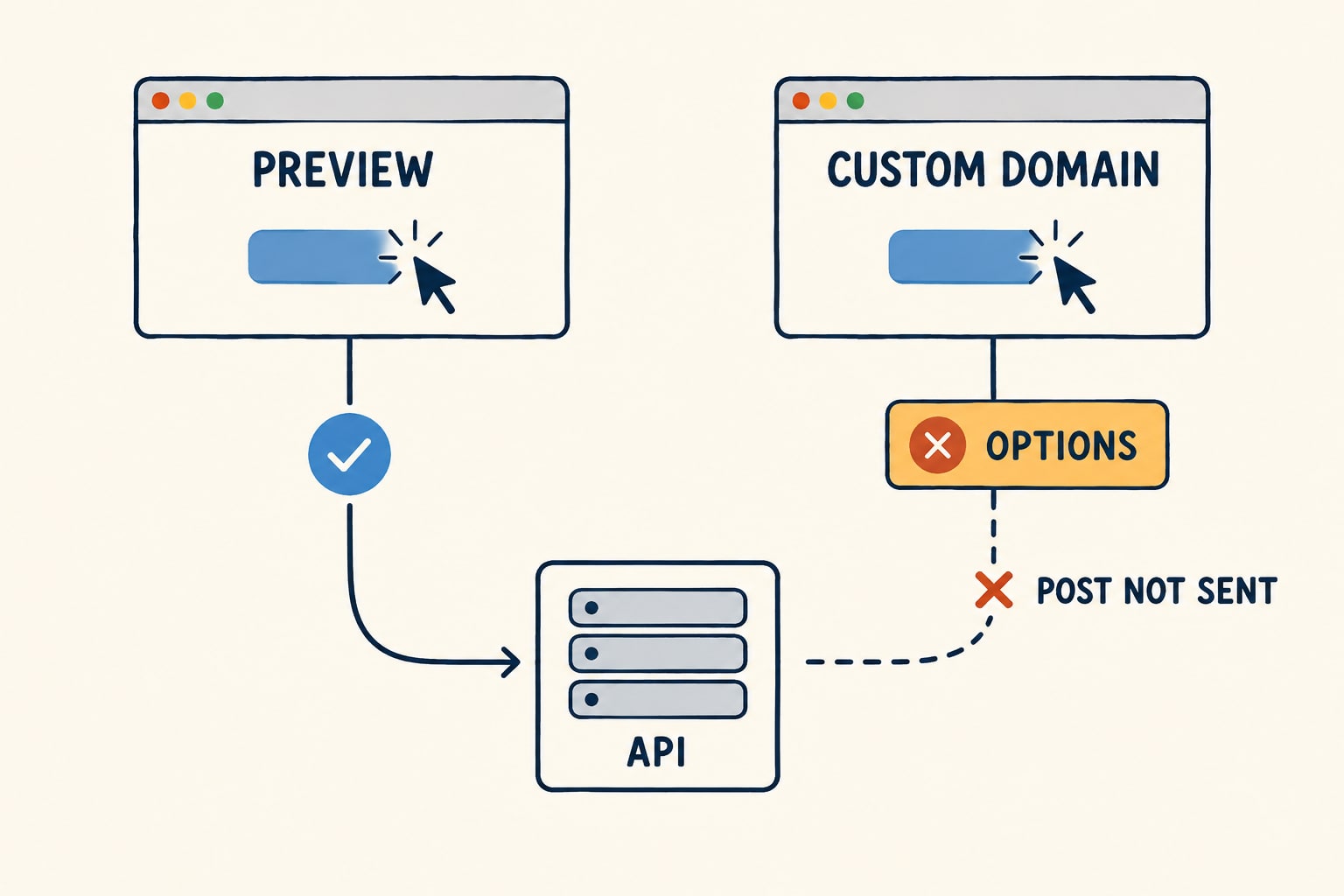
The same checkout button succeeds at your Lovable preview URL and throws TypeError: Failed to fetch at app.example.com. That difference is useful: the browser changed the request’s Origin. If the custom domain’s OPTIONS request fails and the POST never leaves the browser, check the receiving service’s CORS rules before asking Lovable to rewrite the frontend.
Use the two URLs and one repeated customer action to prove or rule out that case. You can then correct one allowed origin, move an unsafe browser call behind an Edge Function, or stop before an unrelated production change.
Every platform claim below was checked against Lovable and Supabase vendor documentation on 2026-10-13. App Rescue Desk is independent and is not affiliated with Lovable or Supabase.
Does this article cover your Lovable “Failed to fetch” error?
This diagnosis fits when all four conditions are true:
- a published Lovable app uses a custom domain;
- the same action works at the Lovable preview URL;
- the custom domain shows
Failed to fetch,NetworkError, or a browser CORS message; - the action calls an API, Edge Function, webhook gateway, upload service, or another remote endpoint.
It does not cover Failed to fetch dynamically imported module. That message concerns a JavaScript file, often after a deployment replaces an older file. Use the production blank-screen and stale JavaScript diagnosis for that error.
The phrase also does not prove that CORS caused the failure. Browsers use Failed to fetch when JavaScript cannot read a response. A failed preflight, DNS failure, invalid TLS certificate, blocked request, offline browser, or server that closes the connection can produce a similar result. The Network panel separates those cases.
Why can Lovable preview work while the custom domain fails?
Browsers define an origin by scheme, hostname, and port. These two URLs therefore have different origins even when they display the same application:
https://project-preview.example
https://app.example.com
A receiving service can allow the first origin and reject the second. This often becomes visible after a custom domain is added, an API allow-list is tightened, or a function starts checking the Origin header.
For some cross-origin requests, the browser sends an OPTIONS request before the real request. This preflight asks whether the origin, method, and request headers are allowed. Supabase requires browser-invoked Edge Functions to handle CORS preflight requests (Supabase CORS guidance).
If the preflight fails, the browser does not send the intended POST, PUT, or DELETE. The button can then look broken even though its click handler ran.
How do you compare preview and production requests?
Test the same action with the same account and input. Change only the app URL.
- Open the Lovable preview URL.
- Open the browser Network panel.
- Enable Preserve log.
- Perform the affected action once.
- Record the request URL, method, status, and
Originrequest header. - Note whether an
OPTIONSrequest appears before the main request. - Repeat the test on the custom domain.
- Compare the two records.
Remove authorization headers, cookies, API keys, customer data, and payment details before sharing a capture.
Lovable’s browser testing can observe console output and network requests during a user flow (Lovable testing documentation). Ask it to test both URLs and report the first request that differs. A statement such as “the button failed” is too broad; the request comparison is the evidence you need.
| What the Network panel shows | What the evidence supports | Correct next check |
|---|---|---|
Preview succeeds; custom-domain OPTIONS fails; main request is absent |
The receiving service did not accept the production preflight | Allowed origins, methods, and headers |
| Preview calls one endpoint; custom domain calls another | The two builds use different configuration | The endpoint embedded in the production build |
The main request returns a readable 401, 404, or 500 |
The browser reached a service and received an HTTP error | Response body and matching server or function log |
| No request appears after the click | The failure occurs before the network call | Click handler and first Console error |
| Both URLs fail in the same way | The custom domain is not the useful difference | Shared endpoint, function, authentication, or provider state |
If production calls the wrong hostname, use the production environment variable comparison. It distinguishes a value saved in a dashboard from the value included in the live build.
If the main request returns an HTTP status, follow the Lovable Edge Function non-2xx diagnosis. A returned 500 and a blocked preflight are different failures.
What does a failed OPTIONS request tell you?
A failed OPTIONS request supports a preflight problem when the main request never appears. Inspect the preflight response for these headers:
Access-Control-Allow-Origin
Access-Control-Allow-Methods
Access-Control-Allow-Headers
Compare their values with the custom-domain request. The allowed origin must match the production origin used by the browser. The allowed methods must include the intended method. The allowed headers must cover the headers the browser requested.
Do not add CORS headers to the Lovable page by editing HTML. The service that receives the request must return them. That service might be a Lovable Cloud Edge Function, a Supabase Edge Function, or an external API.
Also check whether the preflight received a redirect. A browser preflight and the request after a redirect do not always follow the path that application code expects. Configure the frontend to call the final HTTPS endpoint directly when the endpoint is under your control.
What is one custom-domain CORS fix you can try?
Assume a form sends JSON to an Edge Function. The preview origin is allowed, but https://app.example.com is absent from the allow-list. Add the exact production origin. Handle OPTIONS. Return the same CORS headers with the function’s normal response.
This simplified Edge Function pattern shows the three required places:
const allowedOrigins = new Set([
  "https://app.example.com",
  "https://project-preview.example",
])

function corsHeaders(req: Request) {
  const origin = req.headers.get("Origin") ?? ""

  return {
    "Access-Control-Allow-Origin": allowedOrigins.has(origin) ? origin : "",
    "Access-Control-Allow-Headers": "authorization, x-client-info, apikey, content-type",
    "Access-Control-Allow-Methods": "POST, OPTIONS",
    "Vary": "Origin",
  }
}

Deno.serve(async (req) => {
  const headers = corsHeaders(req)

  if (!headers["Access-Control-Allow-Origin"]) {
    return new Response(null, { status: 403 })
  }

  if (req.method === "OPTIONS") {
    return new Response(null, { status: 204, headers })
  }

  // Validate the request and perform the intended work here.
  return Response.json({ ok: true }, { headers })
})
Replace both example origins with domains you control. Match the method and headers to the real request. Do not paste tokens or service credentials into browser code.
Supabase now documents an automatic wrapper for standard browser CORS handling as well as a manual header pattern. Use the current Supabase browser invocation guidance for the runtime and client version in your project.
Do not treat Access-Control-Allow-Origin: * as a universal fix. Credentialed browser requests cannot combine a wildcard origin with credentials. A public wildcard also changes which websites can read the endpoint’s responses. An exact allow-list keeps the change limited to the domains that need access.
After the change:
- Deploy the receiving function or service.
- Reload the custom domain.
- Perform the same action once.
- Confirm that
OPTIONSsucceeds. - Confirm that the main request appears.
- Confirm the complete customer outcome.
A successful OPTIONS response proves only that the browser may continue. It does not prove that checkout, login, upload, or data processing finished correctly.
Can Lovable apply the fix?
Lovable can edit and deploy an Edge Function in a project that uses its built-in backend. Open More → Cloud → Edge functions to inspect status, invocations, logs, and source. Lovable documents that you can describe the required change in project chat and ask it to update the function (Lovable Edge Functions).
Give it a narrow request:
The action works on the preview URL and fails on https://app.example.com.
Compare the two browser requests.
The production OPTIONS request is rejected and the POST is not sent.
Update this function to allow the exact production origin and handle OPTIONS.
Do not change the form or business logic.
Retest the same action on both URLs.
For a project connected to your own Supabase account, inspect the function and logs in that Supabase project. For Lovable Cloud, use More → Cloud → Logs. Lovable’s logs include function request and response data and support time and status filters (Lovable logs).
If the browser calls a third-party API directly and that provider does not allow your production origin, you cannot repair its policy from Lovable. Put the call behind an Edge Function or another server endpoint that you control. Keep the provider secret on that server endpoint.
Once the production origin works, record the preview and custom-domain checks in the Lovable app maintenance checklist. Re-running that pair after a publish catches origin drift before the first customer report.
When is “Failed to fetch” not a CORS fix?
Stop changing allowed origins when the evidence points elsewhere:
- A request returns
401withJWT expiredorrefresh_token_not_found: use the Lovable session-refresh diagnosis for expired JWTs and invalid refresh tokens. - A request returns
404: check the final URL, function name, and deployment. - A request returns
500: open the matching function log. - The hostname differs between preview and production: check the production build configuration.
- The Console says
Failed to fetch dynamically imported module: check the deployed JavaScript files and cached page. - No request appears: inspect the frontend event and first Console error.
Supabase notes that a platform 404 can sometimes surface in the browser as a generic CORS or fetch error (Edge Function 404 troubleshooting). A function can also fail before it adds CORS headers, which hides the useful server error from browser code. Match the attempt to the server or function log before concluding that the allow-list is wrong.
When should this become a Lovable app fix request?
A one-origin correction is a reasonable self-fix when you control the receiving service, the request has no external side effect, and the comparison isolates one missing origin.
Escalate the incident when:
- the failed action takes payment, creates an order, sends email, changes access, or writes customer data;
- the browser and function logs disagree about whether the request ran;
- several services use different origin or callback rules;
- a retry could repeat an external action;
- the custom domain still fails after the preflight succeeds;
- the repair needs production access that you cannot test safely.
Frequently asked questions
Why does my Lovable app say “Failed to fetch” only on the custom domain?
The custom domain has a different origin from the preview URL. If the receiving service allows the preview origin but not the production origin, the browser can block the preflight before it sends the main request. Compare both Network records before changing code.
Does “Failed to fetch” on a published Lovable custom domain always mean CORS?
No. It means browser JavaScript did not receive a response it could use. CORS, DNS, TLS, blocked requests, connection failures, redirects, and some server failures can produce the message. A failed OPTIONS request with no following main request supports a CORS diagnosis.
Can Lovable fix a custom-domain “Failed to fetch” error itself?
Lovable can inspect browser network activity and edit a Lovable Cloud Edge Function. It cannot change an external provider’s origin policy. Give it the two URLs, the failed request, and the difference between the preview and custom-domain results.
Should I set Access-Control-Allow-Origin: * for a Lovable app?
Not by default. Add the exact production origin when the endpoint is intended for that application. Review authentication separately; CORS controls which browser origins can read a response, not who is authorized to perform the action.
Is Lovable “Failed to fetch” the same as “Failed to fetch dynamically imported module”?
No. That message names a JavaScript module that the page could not load. This article covers an application request that fails when the published custom domain calls an API or function.
What evidence should I send for a Lovable custom-domain fetch failure?
Send the preview and production URLs, the exact customer action, timestamp and timezone, the redacted Network records, the first relevant log entry, and the last known successful attempt. Do not send passwords, tokens, cookies, API keys, card data, or customer exports. Follow the desk’s production access and evidence rules when preparing the record.
Is the production request still failing?
If the preview and custom-domain comparison does not isolate one safe change, bring the failed workflow and the evidence above. Scope and price are agreed before anything in production changes.