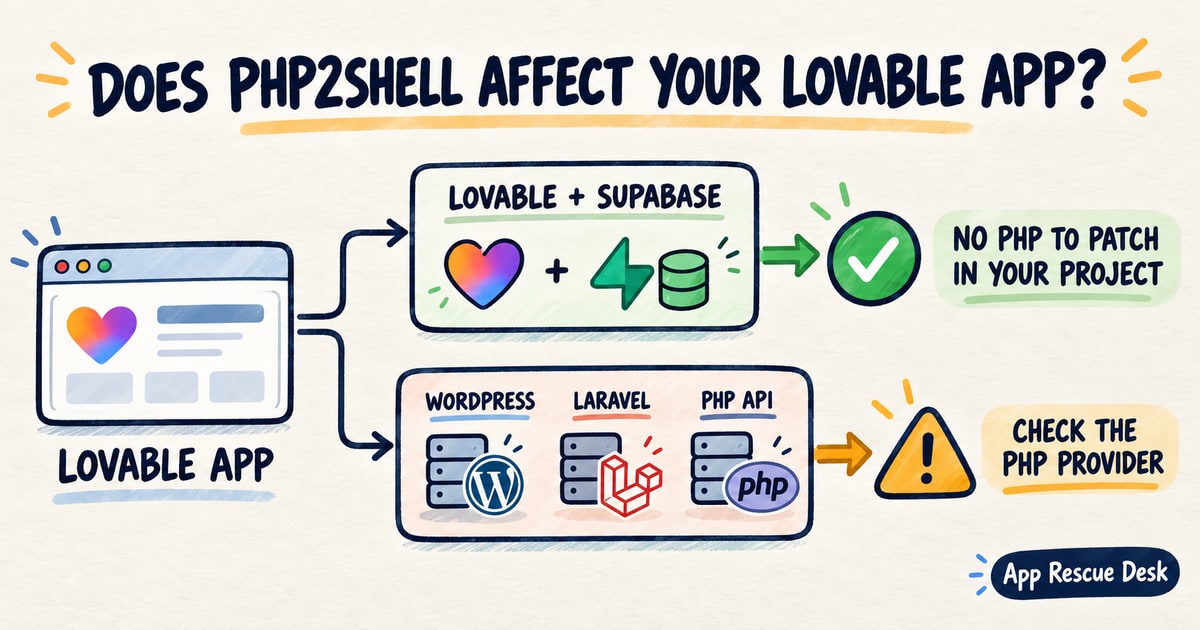
PHP2Shell affects the PHP runtime, not every published app. For a Lovable owner, the deciding question is simple: does the app send requests to a service that runs PHP?
Lovable documents older projects as React and Vite, newer projects as TanStack Start, and the built-in backend as a Supabase-based service. None of those gives the project owner a PHP runtime to update. A connection to self-hosted WordPress, Laravel or a custom PHP API changes the answer.
Every platform claim below was checked against vendor documentation on 2026-10-22. App Rescue Desk is independent and is not affiliated with Lovable, PHP, WordPress or Supabase.
TL;DR
- PHP2Shell refers to two PHP runtime vulnerabilities:
CVE-2026-109618andCVE-2026-109619. - Lovable’s documented stack does not give the project owner a PHP runtime to update.
- A published app can still depend on self-hosted WordPress, Laravel or another PHP service.
- The server owner or hosting provider must confirm and apply the PHP fix.
- If you suspect unauthorised access, preserve the available records and contact a qualified cyber incident response provider.
What does PHP2Shell affect?
PHP2Shell is the informal name for two critical vulnerabilities in the PHP runtime:
CVE-2026-109618: remote code execution through memory corruption during out-of-memory handling.CVE-2026-109619: remote code execution through stale internal state that survives between requests.
The PHP project publicly disclosed both vulnerabilities and released fixed versions on 21 October 2026. The PHP security advisory lists the affected configurations and the available updates. It identifies mod_php as the highest-risk configuration and says updating is the only complete solution.
The fixed releases are:
- PHP 8.2.35
- PHP 8.3.36
- PHP 8.4.27
- PHP 8.5.12
PHP 8.1 and earlier no longer receive normal security releases from the PHP project. Some operating-system and long-term-support vendors provide backported fixes. In that case, a version number alone does not establish whether the vendor package contains the patch.
ENISA’s joint statement tells organisations to identify PHP applications, coordinate with hosting providers and prioritise internet-facing systems. That advice applies to the PHP runtime. It does not make every Lovable or JavaScript app a PHP application.
Has Lovable published a PHP2Shell statement?
We found no PHP2Shell-specific notice in Lovable’s public blog, documentation, status history or Trust Center. Public pages do not reveal every internal component used by the platform.
Lovable has published security notices for vulnerabilities in its app stack. Its September 2026 notice about CVE-2026-102989 in TanStack Start described which hosted apps needed action, the firewall protection it applied and how projects received the patched dependency.
No equivalent PHP2Shell notice was present in the public sources we checked. That absence does not establish whether an app uses PHP. Use the documented architecture, then monitor the Lovable status page and your project notifications for updates.
Why are published-app owners asking whether they are affected?
Hosting customers and operators on Reddit are asking whether managed hosts have applied the fix. Another managed-hosting discussion shows why an old version number can remain visible after a provider backports a patch. Developers on Hacker News are also distinguishing a PHP runtime update from an application update.
The confusion starts when a headline uses website as if it named one technical stack. A Lovable app can use its built-in backend while also calling WordPress or a Laravel API. Only components that run PHP need the PHP2Shell update.
Does a standard published Lovable app use PHP?
Lovable documents two application templates:
- older projects use React and Vite;
- newer projects use TanStack Start for server-side rendering.
The TanStack Start upgrade documentation explains both templates and what changes after an upgrade. It does not identify PHP as part of either template.
Lovable also documents its built-in backend as a Supabase-based environment containing a database, authentication, storage, realtime features and edge functions. The project owner does not choose or update a PHP version for this environment.
For a project owner, the documented answer is:
If the published app uses Lovable hosting and the built-in backend, and it does not call a separate PHP service, there is no documented PHP runtime in the project for you to update.
That answer covers the architecture visible to the project owner. It does not describe undisclosed vendor infrastructure. Lovable is responsible for infrastructure that customers cannot administer.
When can PHP2Shell still affect a published Lovable app?
The browser does not need to run PHP for the app to depend on it. A published Lovable app can send requests to a separate PHP service.
| Published app setup | PHP2Shell relevance | Who must act |
|---|---|---|
| Lovable hosting with the built-in backend only | No documented PHP component in the project | Monitor Lovable notices; do not add PHP changes |
| Lovable frontend calling self-hosted WordPress | The WordPress server runs PHP | The server owner or hosting provider |
| Lovable frontend calling a Laravel or custom PHP API | The API runtime is in scope if it uses an affected PHP build | The API owner or hosting provider |
| Lovable app reading content from WordPress.com | The PHP runtime is managed by WordPress.com, not the Lovable project owner | The managed provider |
| Exported frontend hosted beside a PHP application | The frontend and PHP application have separate exposure | The owner of the PHP service |
Lovable’s WordPress.com connector documentation distinguishes WordPress.com from self-hosted WordPress. WordPress.com manages its runtime. A self-hosted WordPress service has a separate owner and patch process.
How can you check whether a published Lovable app depends on PHP?
Start with the services the app contacts. Do not scan infrastructure you do not own or have permission to test.
- Open the published Lovable app.
- Open the browser developer tools.
- Open Network.
- Repeat one important customer action.
- Record the hostname for each application request.
- Match each hostname to its owner and hosting provider.
Then inspect the project without changing it:
- Search the code for external API base URLs.
- List connected services and webhooks.
- Identify WordPress, Laravel or custom PHP endpoints.
- Record which customer action uses each endpoint.
You can also ask Lovable a read-only question:
List every external HTTP endpoint used by this project.
For each endpoint, show the file and customer action that uses it.
Do not change code, credentials or configuration.
This prompt produces an inventory, not a vulnerability result. An endpoint ending in .php strongly supports a PHP dependency. An endpoint without that suffix can still use PHP behind a route or reverse proxy.
For a server you administer, check the active PHP package through the hosting panel or package manager. If a provider manages it, ask whether the active runtime includes both fixes. Do not rely on a response header alone. Many services remove or replace runtime headers.
What should you do if a connected PHP service may be affected by PHP2Shell?
If a hosting provider manages the service, ask the provider to confirm its patch status. If you manage the server, follow the PHP vendor’s instructions. Changing the Lovable frontend does not update PHP.
- Record the hostname used by the app.
- Identify who manages that service.
- Record the active PHP package.
- Install the vendor’s fixed package if you manage the server.
- Restart the required web workers.
- Confirm that the workers use the fixed package.
- Test one authorised request through the app.
The PHP advisory includes temporary exposure-reduction measures, but states that they are not a complete solution. Do not present a WAF rule or configuration workaround as equivalent to installing the fix.
If logs or account activity indicate possible exploitation, stop normal application changes. Preserve the available records and contact a qualified cyber incident response provider. Do not send logs, secrets or customer data through a public form. The App Rescue Desk access and security boundaries explain why suspected breaches need a different route.
What should you test after the PHP service is updated?
Installing the fixed PHP package addresses the known vulnerabilities. It does not show whether login, payments, forms or data requests still work.
Repeat one controlled action for each affected integration:
- Use an authorised test account.
- Record the start time and timezone.
- Submit the action once.
- Check the browser response.
- Check the matching record in the PHP service.
- Confirm the expected final state in the Lovable app.
Record the result as the new baseline for the critical-flow checks in the Lovable app maintenance checklist, so the next provider update is verified the same way.
Do not repeat payment, order or message requests in bulk until you know which original requests completed. A timeout or 502 response does not prove that the external service performed no work.
If the page now shows a gateway response, use the 502 Bad Gateway investigation for a live web app to separate the public failure from the upstream result. If Lovable reports a function failure while it calls the external service, follow the Lovable Edge Function non-2xx diagnosis and retain the original response status.
When does a Lovable app need separate repair after the PHP update?
A PHP service can be updated while the published Lovable app remains broken. The integration can still fail for a separate reason:
- the API hostname or route changed during emergency maintenance;
- credentials or OAuth scopes were replaced;
- the PHP service now rejects an older request format;
- a webhook completed but the Lovable backend did not record the result;
- requests failed during downtime, and their final state is unclear;
- repeating a request could duplicate a payment, message or record.
The next task is to find which request failed, whether the external service completed it and what the app must do next.
If repeated Lovable prompts change the error without identifying that request, use the investigation for Lovable app bugs that survive “Try to fix” before changing more code.
Frequently asked questions about PHP2Shell and Lovable apps
Is every published Lovable app vulnerable to PHP2Shell?
No. Lovable documents React and Vite or TanStack Start, with a Supabase-based built-in backend. Check whether the app calls a separate PHP service before taking PHP-specific action.
Has Lovable confirmed that its hosted apps are unaffected by PHP2Shell?
We found no public PHP2Shell statement from Lovable. Its documented stack does not identify PHP as a customer-managed component. Monitor Lovable’s status page, project notifications and security announcements for an update.
Can a Lovable app that connects to WordPress be affected by PHP2Shell?
A self-hosted WordPress service can be affected if it runs a vulnerable PHP package. WordPress.com manages its own runtime. For self-hosted WordPress, the server owner or hosting provider is responsible for the PHP update.
Should you scan a Lovable URL for PHP2Shell?
Do not run vulnerability scanners against infrastructure you do not own or have permission to test. First identify whether the app contacts a PHP server. Ask the responsible provider to confirm its patch status.
Who should handle a suspected PHP2Shell exposure connected to a Lovable app?
Ask the PHP service owner or hosting provider to confirm the patch status. If you suspect exploitation, contact a qualified cyber incident response provider. App Rescue Desk does not provide vulnerability scanning or breach response. After the provider finishes that work, the desk can investigate a previously working Lovable app that remains broken, with scope and price agreed before anything in production changes.