The same order, contact, or row appears twice in the destination, often seconds apart. Zap History contains two Successful runs, but that alone does not identify which action created either record. Before deleting or replaying anything, trace one duplicate pair to the run and write step behind each destination ID. The deciding pattern is usually the same source ID in two Zaps, two runs of one Zap, or two write steps in one run.
This procedure covers Google Sheets rows; HubSpot or Salesforce contacts and deals; Pipedrive persons; Airtable records; Zapier Tables records; and database rows in Supabase or PostgreSQL written by a Create action. It applies to reports of Zapier creating duplicate records, including duplicate rows in Google Sheets and duplicate contacts in HubSpot.
Zapier calls the symptom “Zap is creating duplicate data”. The pair may come from two Zaps, repeated runs, two write steps, a loop, a replay, or a process outside Zapier. Matching timestamps do not identify the writer.
Every platform claim below was checked against vendor documentation on 2026-11-07.
App Rescue Desk is independent and is not affiliated with Zapier, Supabase, or Stripe.
TL;DR
When investigating Zapier duplicate records, work from one stable source ID and one duplicate pair.
- Search Zap History for the duplicated order, submission, or source record ID.
- Separate matches into three branches: several Zaps, repeated runs of one Zap, or several write steps in one run.
- Record the run time, Zap version, action output, destination ID, and destination creation time.
- If no run or write output matches, classify the result as inconclusive and inspect other integrations and destination automation.
- Do not bulk replay, merge, or delete records until you know which process wrote each one.
Two records for one order: what to collect before you change the Zap
Choose a duplicate pair with a stable business identifier: an order ID, form submission ID, booking reference, or source record ID. Do not use a customer name as the key. Different people can share a name, and one customer can submit more than once.
Capture these destination details before opening the Zap editor:
- both destination record IDs;
- each creation time and its time zone;
- the source ID stored on each record;
- fields that differ between the records;
- links from orders, invoices, payments, messages, or other dependent records;
- destination automation that ran after each create operation.
Put the results into a trace matrix. Leave both records unchanged while you build it.
| Source ID | Trigger event ID | Zap run ID and time | Zap name and version | Write step | Destination record ID and creation time |
|---|---|---|---|---|---|
source-identifier |
If available | Exact time and run link | Name plus historical version | App and action | Both duplicate IDs |
Open the trigger and every action that can write the destination object. Capture the relevant Data In and Data Out fields. Remove credentials, tokens, personal data, and unrelated payload fields from your notes.
Zapier’s Zap History documentation says run details include timestamps, received and sent data, and the Zap version used. Check the historical version because the current editor may show a different workflow from the one that wrote an older record.
For a webhook or custom API destination, inspect the application access and request logs as well. Match the source ID, endpoint path, request time, response status, and destination ID. Use database audit records only if auditing was already enabled. A missing audit record proves nothing when the database never recorded that event type.
Preserve relevant history promptly. Zapier documents retention of up to 60 days of run data and displays up to 10,000 runs. Do not delete a run as an attempt to undo its action. Zapier’s run-status guidance states that deleting a completed run removes the history entry but does not reverse the destination action.
What does the Zap History search pattern tell you?
Search Zap History with the duplicated identifier. Open each plausible match and follow the value from the trigger input to the write action output.
Use this decision table to interpret the result without overstating it:
| Observed pattern | What it supports | Confidence and limit |
|---|---|---|
| The same source ID appears in several Zaps, and each write action returned one of the duplicate record IDs | Several Zaps wrote the duplicate pair | Confirmed for the writers. It does not explain why both Zaps received the event. |
| One Zap has two runs, and each write action returned a different duplicate record ID | The same Zap wrote twice | Confirmed for the writes. The cause could still be two source events, a broad trigger, a loop, or a replay. |
| One Zap has two runs with the same source ID, but the action output has no destination ID | Repeated invocation of that Zap | Strongly supported. Match destination times and request logs before attributing the records. |
| One run contains two write steps, and both outputs identify the duplicate records | One run wrote both records | Confirmed. Inspect why both steps target the same business object. |
| Similar runs recur seconds apart | A loop | Strongly supported only when an earlier write appears in a later trigger. Timing alone is inconclusive. |
| A related replay run appears later, and its write output identifies the second record | A replay created the second record | Confirmed. Without the output or destination correlation, replay remains only a candidate. |
| No matching run appears | No Zapier cause can be established from the available history | Inconclusive. History may have expired, or another system may have written the record. |
Read statuses at both the run and step levels. Zapier currently uses Successful, Filtered, Errored, On hold, Running, Safely halted, Delayed, Scheduled, and Skipped; it also documents Handled error and Needs review. Skipped applies only to a step, not a complete Zap run. A Successful run means the recorded steps completed without an issue. It does not show that the run was expected or that a second run was valid.
Same ID in several Zaps
Compare the trigger app, connected account, trigger event ID, and write action in every match. Finding the source ID in trigger data only proves that a Zap received it. Attribute a destination record only when the write output returns that record ID or a destination request correlates with the run.
If both Zaps intentionally consume the event, assign ownership of the create operation. A Filter can separate mutually exclusive conditions; Paths can keep related outcomes in one workflow. Do not disable every matching Zap, because some may perform required actions unrelated to the duplicate write.
Same Zap, two runs
Two history entries establish that the Zap ran twice. They do not, by themselves, prove that the Zap triggered twice from two source events. A full-run replay creates another run and starts at the trigger; replaying a failed step does not replay the trigger.
Compare the historical Zap version, trigger data, and event IDs. Different event IDs support separate source events or a broad trigger that reacted to several changes. One source record can produce several events, especially with an update-capable trigger.
A replay marker or related-replay link supports the replay branch. If neither appears, compare the trigger output, exact times, and destination request logs. Do not classify nearby runs as a replay based on timing alone.
One run, two write steps
Inspect every action that can create or upsert the destination object, including conditional branches and custom webhook requests.
If two steps returned the two destination IDs, the writer is established. Then determine why both steps targeted the same business object. If only one output contains a record ID, inspect the other request before assigning responsibility.
One visible write does not exclude destination-side automation. A database trigger, webhook handler, or native workflow may create the second record after Zapier writes the first.
We reproduced the copied-Zap cause with Zapier Tables
On 2026-11-07 we reproduced the copied-Zap branch on Zapier. The test used only Zapier Tables, with no third-party app. The source table, ARD QA Orders, contained an order_id field. The destination table, ARD QA CRM, contained order_id and created_by.
Zap A used a Tables New Record trigger and a Tables Create Record action. We duplicated Zap A to create Zap B, then published both. We set created_by to Zap A and Zap B (copy) so the writer would remain visible; an unmodified copy would write the same values.

We added one source record, TEST-1001. The destination received two rows with that order ID.

Searching Zap History for TEST-1001 returned two Successful runs, one for each Zap, both at 12:01:06 am.
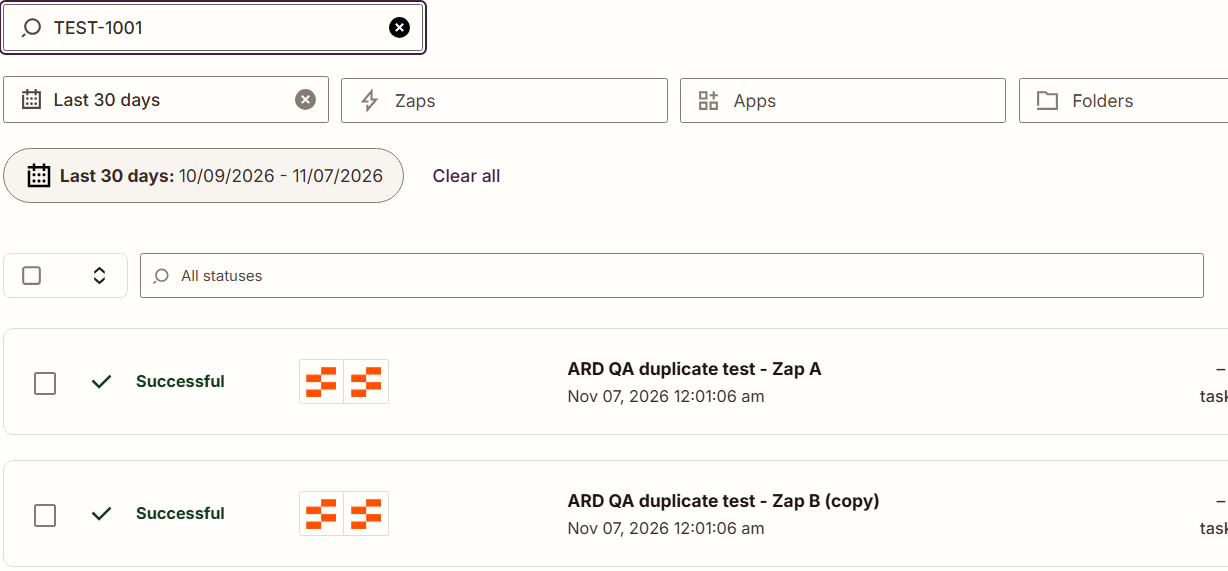
In this controlled test, the runs identified the copied Zap as the second writer. A replay would not explain one write from Zap A and another from Zap B. We turned off both test Zaps after the reproduction.
Why does one Zap keep creating the same record again?
When someone reports Zapier creating duplicates, inspect the documented causes before editing several steps at once. Zapier’s duplicate-data guidance lists five:
- static values instead of dynamic values;
- broad trigger settings, including the Google Sheets
New or Updated Spreadsheet Rowtrigger; - multiple Zaps using the same trigger;
- unintentional Zap loops;
- timeouts.
People sometimes call the extra executions duplicate tasks. For Classic Zaps, Zapier defines a task as each successful action that runs. Two tasks may therefore come from two actions in one Zap run. Task usage alone does not prove duplicate triggers.
Static values and broad triggers
Open the write action and inspect its input. Look for hard-coded test text where the action should use a mapped field.
A static order or customer ID can make unrelated source events look identical in the destination. Compare several production runs before replacing it. One run may contain an exceptional payload rather than the normal field mapping.
For a broad trigger, identify the exact source change behind each run. Google Sheets New or Updated Spreadsheet Row can react to updates on the same row. Review which columns should trigger the Zap. Use a narrower trigger when the app provides one; otherwise, add a Filter that admits only the intended changes.
Loops
Zapier documents three common loop shapes: one Zap triggers itself, two Zaps trigger each other, or an update action changes the same record watched by an update trigger.
Its Zap loop guidance provides three concrete controls:
- add a unique marker to an unused field, then use a Filter with
Does not contain; - add a
Processed by Zapfield, set it in the update action, and continue only while that field is empty; - replace
CreatewithFind or Createin a two-Zap loop.
Do not label repeated runs as a loop until one write appears in a later trigger. Trace this sequence:
- Identify the record that Run A wrote or updated.
- Find the event produced by that write.
- Match the event in Run B’s trigger data.
- Confirm that Run B wrote or updated the same business object.
If a confirmed loop is still creating records, turn off only the affected Zap or Zap pair. Record the containment time and preserve the unprocessed backlog.
Find or Create that still duplicates
A Find or Create action avoids a create only when its lookup key identifies the existing record. Use an immutable source ID where the destination supports one. Names and editable labels are weak keys.
Inspect the lookup value and search result in the run. Do not assume that the connector normalizes whitespace, punctuation, or letter case. Treat a formatting difference as causal only after a controlled lookup produces different results.
Zapier describes Find or Create as a search followed by a create when no match exists. Its documentation does not say that the destination enforces atomic uniqueness across concurrent runs. The step’s presence therefore does not prove that simultaneous requests cannot create two records.
After finding the cause, change one control. Send one identifiable test event, then confirm one matching run and one destination record.
Can a timeout replay create duplicate records?
Yes. The first request can finish in the destination even when Zapier does not record a normal response. Replaying that action can then create a second record.
Zapier documents two separate errors: “Soft timeout limit reached.” and “The app did not respond in time.”. Autoreplay does not retry a step that encountered the soft timeout error. It can attempt the second error when Autoreplay is enabled. In either case, inspect the destination before replaying because the original action may already have completed.
Did a Zapier replay duplicate records?
Compare the second record’s creation time with the original action and the replay. A record created at replay time, together with a replay output containing that record ID, confirms the replay as its writer. If both records were created during the original run, the replay branch is not supported.
Before replaying anything:
- Search the destination for the source ID.
- Open the original run and related replay entries.
- Check for a replay marked
ScheduledorRunning. - Replay only an item confirmed as missing.
- Inspect the destination after that attempt.
Do not use a full-run replay as a cleanup shortcut. Zapier’s replay documentation says a full replay starts at the trigger and runs every step, including steps that previously succeeded. For a focused timeout procedure, follow how to check whether a timed-out Zapier action completed. If the runs failed on an expired connection instead, use the same replay boundary when replaying tasks after a Zapier 401 Unauthorized fix.
How do you stop the destination from accepting the same record twice?
Zap-level controls reduce repeated requests. Destination uniqueness prevents separate requests from becoming separate rows.
For a Supabase or PostgreSQL destination:
- Store the source system and immutable source ID in dedicated columns.
- Define the columns that form one business identity.
- Reject conflicting inserts or handle them with an intentional upsert.
- Return the existing destination ID when the integration allows it.
- Log the source ID, request ID, outcome, and destination ID.
PostgreSQL unique indexes reject equal indexed values. Standard uniqueness allows multiple null values, so a nullable source ID leaves a gap in the guard. Decide whether Zap-created rows must contain a source ID before adding the constraint.
With a unique constraint on the chosen non-null key, the second plain insert fails with duplicate key value violates unique constraint. PostgreSQL’s error-code appendix identifies this as SQLSTATE 23505, or unique_violation. Through the Supabase REST API, SQLSTATE 23505 maps to HTTP 409.
PostgreSQL INSERT ... ON CONFLICT can ignore the repeated write with DO NOTHING or update the existing row with DO UPDATE. Choose the behavior from the business rule. A retry must not overwrite a reviewed status, payment reference, or newer customer data merely because it arrived later.
Remove or reconcile existing duplicates before adding the guard. PostgreSQL checks existing data while creating a unique index and rejects the index when duplicate indexed values remain. For Supabase, plan the change against its underlying Postgres database and review the locking considerations in the Supabase index guide.
For a webhook receiver, store the stable source event or business-operation ID before applying the effect. A repeated request with that ID should return the existing result or safely do nothing. The same principle appears in how idempotency prevents duplicate Stripe charges and fulfillment, although each integration needs its own identifier and response behavior.
Should you clean up duplicates before or after fixing the Zap?
Contain or repair the confirmed writer first. Otherwise, cleanup can delete records while the workflow continues to recreate them.
Use this order:
- Complete the source-to-run-to-destination mapping.
- Stop or repair the confirmed writer.
- Send one controlled, production-shaped test.
- Check scheduled replays and destination automation.
- Back up the affected records and relationships.
- Reconcile each duplicate pair.
- Add a destination uniqueness guard where appropriate.
- Monitor the next legitimate events.
Do not automatically retain the oldest record. Apply the documented business rule. The authoritative record may be the earliest, the most complete, or the one already referenced by orders, messages, payments, and audit history.
Do not delete a record linked to a payment, invoice, reservation, shipment, or customer-visible identifier until those references have been reconciled. A merge is also unsafe when the records contain conflicting status or ownership data.
Before cleanup, confirm all of the following:
- The trace matrix identifies the writer for each retained example.
- One controlled test passed after the source correction.
- No replay remains scheduled or in progress.
- Dependent records have been inventoried.
- A recoverable backup or export exists.
- The proposed unique key matches the actual business identity.
When duplicate records need reconciliation instead of a Zap setting change
This procedure does not define matching rules for every CRM, diagnose Zapier billing, or prove a Zapier service incident. A search with no matching run remains inconclusive unless destination or application logs identify another writer.
A Zapier setting change cannot fix these situations:
- The writer is not Zapier. Zap History shows one run or none for the pair, so the second record came from the app’s own automation, a webhook the source sent again, a double form submission, or another tool. Only destination and server logs show that writer.
- Concurrent runs get past Find or Create. Two runs can search before either one creates. The lasting fix is a uniqueness guard in the destination, such as a unique constraint, a unique CRM property, or an idempotency key in the webhook receiver, which is an app or schema change rather than a Zap setting.
- A timeout left the outcome unknown. The step reported
Soft timeout limit reached.while the action had already completed, and a replay wrote the second record. The destination has to reject the repeat. - The duplicates are already linked to orders, invoices, payments, sent emails, or shipments. Cleanup then means choosing the authoritative record, moving its relationships, and confirming that nothing was charged or shipped twice.
- Existing duplicates block the guard. A unique index cannot be created while duplicate values remain, so reconciliation and a careful change to the live database come first.
If the writer remains unclear or cleanup affects linked production data, use the Zapier fix service. App Rescue Desk can correlate Zap History, destination records, webhook requests, application logs, and database constraints, with scope and price agreed before anything in production changes.