200 OK is not a delivery receipt for a Zapier webhook. It confirms that an endpoint answered the POST. It does not confirm that Zapier created a run, that later actions finished, or that the CRM received the lead.
To fix a Zapier webhook that is not working, trace one external event ID across three records: the sender delivery log, Zap History and the destination record. A 404 keeps the investigation at the webhook URL. A 200 with no matching run moves it to the route, payload, timing or processing delay. A matching run moves it downstream to the first failed action.
Do not resend the backlog until that classification is clear. Start with one lead, order or booking ID, then match its sender timestamp and HTTP response to Zap History before changing the webhook or replaying missed events.
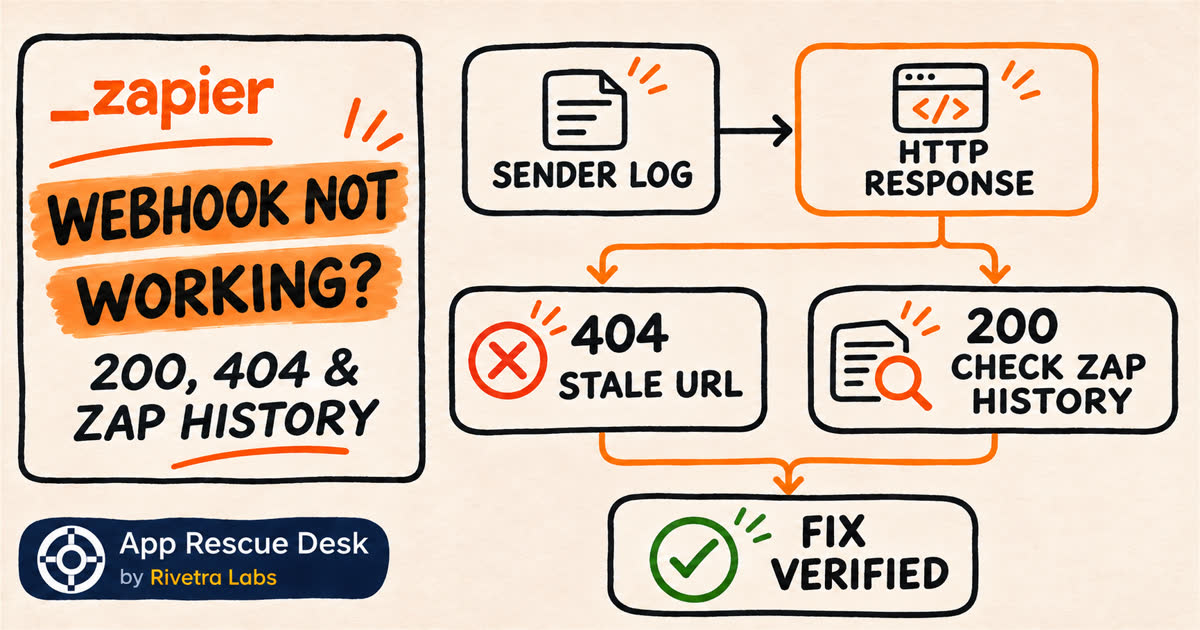
Every platform claim below was checked against Zapier documentation on 2026-11-05. Public forum reports are used only to identify real business consequences and diagnostic questions. They do not establish how often Zapier webhooks fail. App Rescue Desk is independent and is not affiliated with Zapier.
What does a Zapier webhook response prove?
The response proves what the webhook endpoint returned to that request. It does not prove that every Zap action finished or that the CRM, inbox or order system contains the expected result.
Zapier’s current behavior gives 200 and 404 different meanings for static Catch Hook and Catch Raw Hook URLs:
200means the endpoint returned a successful HTTP response. It does not prove that later Zap steps completed.404can mean that the Zap behind a static webhook URL is off or deleted.- A Zap that was just turned off can briefly continue returning
200. - During high webhook volume, Zapier can return
200while processing is delayed. - An invalid payload can receive a success response but still fail to create the run you expected.
The reliable unit of proof is one business event traced across three systems: the sender log, Zap History and the destination result.
How do you fix a Zapier webhook that is not working?
Start with one recent production event that should have created a result. Use an event with a stable external ID, not only a customer name.
- Open the source application’s delivery or request log.
- Record the external ID and exact timestamp.
- Record the HTTP method, destination URL and response status.
- Open the published Zap’s Catch Hook trigger.
- Compare its current webhook URL with the logged destination URL.
- Search Zap History around the same timestamp.
- Search the destination system for the same external ID.
- Classify the event before changing or replaying anything.
Use the evidence to choose the correct branch:
| Evidence | What it establishes | Next action |
|---|---|---|
| No sender log | The source has not proved that it sent the event | Check the source trigger, subscription and delivery settings |
404 and no Zap run |
The logged webhook URL did not resolve to an active listener | Compare the stored URL with the current published Catch Hook URL |
200 and no Zap run |
The endpoint answered, but the expected run is not proved | Check payload format, URL, timing and processing delay |
| Zap run exists and a later step failed | The webhook reached Zapier | Diagnose the first failed action instead of replacing the webhook |
| Zap run succeeded but the result is missing | Zapier recorded a completed route, but the business outcome is not verified | Compare step output, mapped IDs and the destination system |
This classification prevents a common repair mistake: replacing a working webhook when the first failure is actually in a later CRM, email or database step.
A Zapier user asked in Zapier Community whether there was a detailed record of successful and failed webhook attempts. The useful record is not a single green connection test. It is the matching Zap History run and the data in and out for each step. If no matching run exists, there is nothing to inspect or replay inside Zapier, so the investigation moves back to the sender and trigger route.
How do you fix a Zapier webhook that returns 404?
Open the trigger in the published Zap and copy its current webhook URL. Compare the complete URL with the destination stored in the sending application.
A stale URL can remain after the trigger was recreated. Zapier also documents that changing a Zap owner in a Team or Enterprise account changes the Catch Hook URL. The sending application must then be updated with the new URL.
Use this controlled fix:
- Confirm that the correct Zap is on.
- Confirm that the current draft has been published.
- Copy the Catch Hook URL from the published trigger.
- Replace the old URL in the sending application.
- Send one test event with a unique external ID.
- Confirm that the sender no longer receives
404. - Confirm that one matching run appears in Zap History.
- Confirm that the destination contains one matching result.
Do not treat a new 200 response as the final verification. The test is complete only when the same external ID appears once in Zap History and once in the intended destination.
Why can a Zapier webhook return 200 but create no run?
First, compare the logged URL character by character with the current Catch Hook URL. A request log from a different environment, old Zap or test endpoint can show a real 200 that belongs to the wrong route.
Then check the request body and Content-Type. Zapier accepts valid JSON, XML or form-encoded payloads for webhook triggers. Zapier documents that an invalid payload may be ignored even when the endpoint returns a success status.
If the payload is valid, check the timing and volume. Zapier can delay webhook processing during high activity after returning 200. Search Zap History using a wider time window before you resend the event.
If the source log cannot show the request body, temporarily send a new non-customer test event to a request inspector such as Webhook.site. That establishes whether the source application sends a valid request. Do not redirect live customer traffic without a rollback plan.
If the same request reaches Webhook.site but not the current Zapier Catch Hook, the evidence points toward the Zapier URL or payload route. If neither endpoint receives it, return to the source application’s webhook subscription.
A Meta Lead Ads and Zapier user reported on Reddit that leads existed in Ads Manager but were absent from both Zapier and Pipedrive, so they were downloaded and entered manually. That observation does not identify whether Meta, permissions or a webhook subscription caused the gap. It does identify the correct boundary. Because Zap History had no matching run, editing a later Pipedrive action could not recover those leads. The next useful comparison is the list of Meta lead IDs against Zap History, followed by a check of the source subscription and delivery evidence.
What if Zap History contains the run but the lead or order is missing?
The webhook worked well enough to create a Zap run. Replacing the Catch Hook URL will not fix a downstream action.
Open the matching run and find the first step that did not produce the expected result. Compare its data in, data out and status with the external ID from the source event.
If the step failed, diagnose that error before replaying. A timed-out action may already have created the destination record, so follow the result check in Zapier Soft Timeout Limit Reached: Did the Action Finish? before retrying it.
A team using Quo and Zapier reported on Reddit that the connection test still appeared to work while live automation actions failed. One affected user said the team was entering new leads into its CRM manually while the integration was unavailable. The green connection test therefore did not prove that the live business route worked. For the equivalent incident, preserve one failed run, inspect the first failed action and compare its external lead ID with the CRM before reconnecting accounts or replaying a backlog.
If Zap History has no run at all and the source is a native app trigger rather than a Catch Hook, use the separate checks for a Zapier trigger that stopped creating live runs. That problem starts with the selected account, trigger event and options, not an HTTP response from a webhook URL.
Why is webhook evidence commercially important?
The public cases above do not prove a Zapier-wide defect or establish how frequently webhooks fail. They show why the technical evidence has to be connected to the business event. A missing paid lead is not resolved when a test request turns green; it is resolved when the lead is accounted for in the source, Zap History and the CRM.
For a lead, order or booking workflow, preserve this incident record:
- the affected time range;
- the source event or record ID;
- the sender timestamp, URL and HTTP status;
- the matching Zap History run ID, or confirmation that none exists;
- the destination record ID, or confirmation that none exists;
- every manual resend or replay already attempted.
That record separates a one-event configuration fix from a recovery project. It also prevents two people from resending the same backlog through different Zaps.
How do you recover missed webhook events without creating duplicates?
Define the incident window before you resend anything. Export or list the source events created during that window. Match each stable external ID against Zap History and the destination system.
Classify every event as:
- never sent by the source;
- sent but absent from Zap History;
- present in Zap History and failed later;
- completed once in the destination;
- completed more than once;
- unclear because no stable ID exists.
Before retrying the missing group, inventory every active Zap and webhook route that can create the same destination record. A Zapier user reported on Reddit that an agency, a marketing manager and a salesperson had each created Zaps for the same Facebook campaigns. Several routes were sending the same leads through webhooks, and disabling the redundant Zaps stopped the duplicate attempts. The lesson is not that every duplicate comes from parallel Zaps. It is that replaying a backlog before listing all active producers can multiply an incident that began as missing data.
A Zapier replay requires an existing Zap run. An event that never produced a run must be recovered from the source system or through another controlled import path. Do not use a full Zap replay to compensate for a missing trigger event.
Retry only events whose destination result is verified as missing. Run one event first. Confirm that it creates one result with the expected external ID. Then process the remaining verified-missing group in batches small enough to audit.
When does a webhook problem need a wider repair?
One corrected URL and one verified test can close a simple 404 incident when no production events were missed.
The problem needs a wider diagnosis when:
- paid leads, orders, bookings or support requests are missing;
- the start of the incident is unknown;
- the sender has
200responses but Zap History has gaps; - some destination records exist and others do not;
- retries or parallel Zaps have already created duplicates;
- the workflow has no stable external ID for reconciliation;
- several production systems send to the same webhook;
- the fix requires changing the live route while traffic continues.
At that point, success is not “the test turned green.” Success means the current route works, the incident window is reconciled and every recovered business event produces exactly one verified result.
Frequently asked questions about fixing Zapier webhooks
Can a Zapier webhook return 200 without creating the expected Zap run?
Yes. A 200 response does not prove that later actions completed. Zapier also documents cases where invalid payloads can receive a success response without triggering the expected run, and high volume can delay processing.
Why did my Zapier webhook URL start returning 404?
The Zap may be off or deleted, or the sender may hold an old Catch Hook URL. Recreating the trigger or changing the Zap owner in a Team or Enterprise account can require updating the sender with the current URL.
Can I replay a webhook event that does not appear in Zap History?
Not through Zapier replay, because there is no run to replay. Recover that event from the source system or a controlled import, and verify the destination before resending it.
What proves that the Zapier webhook fix worked?
One new event with a unique external ID must produce one matching Zap History run and one correct destination result. For a production incident, the earlier affected window must also be reconciled.
Sources
Platform behavior: