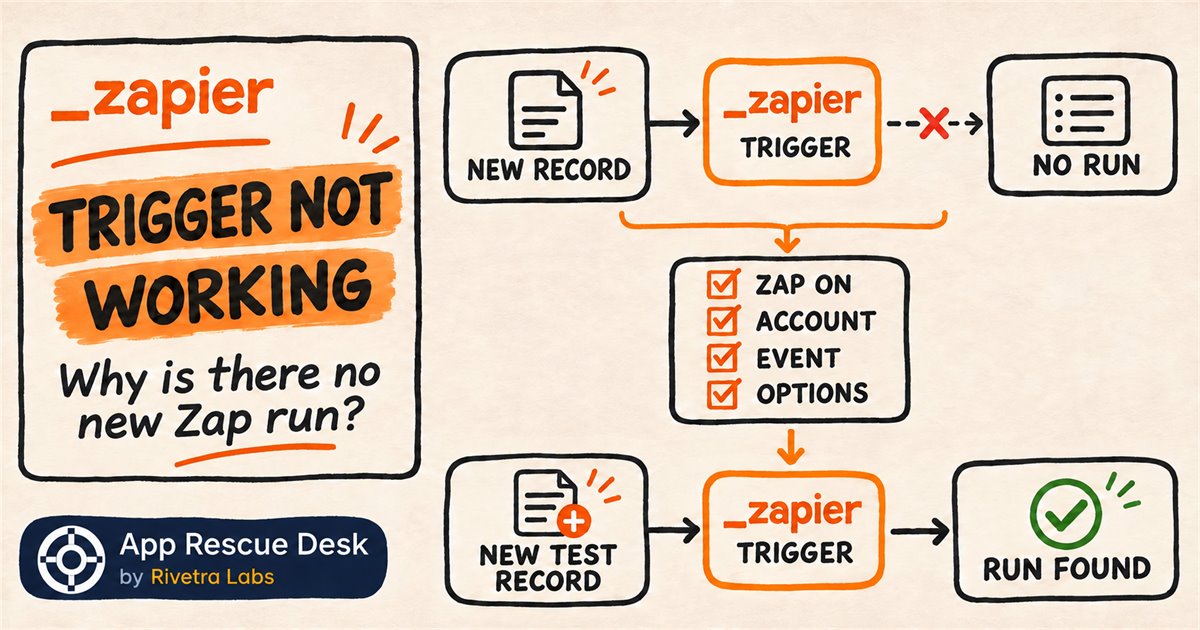
A new order, lead or form submission is visible in the source app, but the corresponding Zap run never appears in Zap History. There is no failed action to replay because Zapier did not create a run for that event.
Before you edit any actions, check the account, event and options in the Trigger step. Then create one new test record while the Zap is on and confirm whether it produces a run.
If the source sends to a Webhooks by Zapier Catch Hook and its delivery log shows an HTTP status, use the separate Zapier webhook 200/404 fix. That diagnosis starts with the sender URL and response rather than a native app trigger’s account and event settings.
Every platform claim below was checked against Zapier documentation on 2026-11-03. App Rescue Desk is independent and is not affiliated with Zapier.
What does “Zapier trigger not working” mean when Zap History has no run?
A trigger starts a Zap when the connected app supplies new data that matches the trigger settings. If Zap History has no run for a specific record, the workflow never reached its action steps.
That distinguishes a trigger problem from a failed action. A failed action leaves a run to inspect. A missing run means the first useful checks are in the source app and the Trigger step.
Zapier lists these common causes:
- the Zap is off;
- the record existed before the Zap was turned on;
- the trigger uses the wrong app account;
- the selected trigger event does not match the record;
- a trigger option excludes the record;
- the app connection or its permissions changed.
Is the Zapier trigger broken, or is the run only delayed?
Before you change the Zap, identify its trigger type in the editor.
A clock icon marks a polling trigger. Zapier checks the source app at intervals, so the run can appear later than the record. Wait for the polling interval before you classify the event as missing.
A lightning icon marks an instant trigger. The source app sends the event to Zapier as it occurs. If the source app contains the record but Zap History remains empty, check the selected account, event and trigger options.
Use new data for this test. Zapier does not trigger from records that existed before the Zap was turned on, so an old record cannot establish whether the current trigger works.
How do you test a live Zapier trigger with one new record?
Create a test record that you can identify and delete later.
- Open the affected Zap.
- Confirm that the Zap is on.
- Open the Trigger step.
- Check the selected app account.
- Check the selected trigger event.
- Open Configure if the trigger has options.
- Check each selected list, status or folder.
- Correct one setting if you find a mismatch.
- Publish the draft. Edits to a live Zap stay in a draft until you publish it.
- Create one new record in the source app.
- Note the record ID and creation time.
- Wait for one polling interval if the trigger uses polling.
- Search Zap History for the record ID or another unique value from the record.
Use the result to choose the next check:
- If the run appears, the trigger received the new record. Check filters, paths and action steps next.
- If no run appears after one polling interval, the trigger still cannot see the record. Check the account permissions and any documented app-specific trigger limits.
Change one setting at a time. One test record then shows whether that change restored the trigger.
Which Zapier trigger setting can exclude valid production records?
The Zap can remain on and connected while one trigger option points at the wrong data set.
For example, a production form now adds subscribers to a Customers list, but the New Subscriber trigger still watches Newsletter. Open the trigger’s Configure tab. Select Customers. Publish the draft. Create one test subscriber. Then confirm that Zap History contains one matching run.
This test checks the same route used by production records. Turning the Zap off and on cannot correct a trigger that watches the wrong list.
An off-and-on reset is useful when the account, event and options are already correct. Zapier suggests it as a later step that can refresh the trigger data and the app connection. Turn the Zap off, turn it on again and create a new test record after the reset.
What if the Zapier trigger account is connected but new runs are still missing?
A selected connection can still point to the wrong workspace or lack permission to read the required records. Open the trigger’s Account tab and identify the exact account in use. Then check that account’s role and third-party integration permissions in the source app.
Similar connection names can hide a test workspace or an account that belongs to a former team member. Check the account identity instead of relying on its display name.
If Zapier reports an authentication error while you test the connection, follow the checks for a Zapier 401 Unauthorized app connection. Reconnecting is relevant when credentials failed. It does not correct a wrong trigger event or an excluded list.
When does a Zapier trigger problem need a wider diagnosis?
If the corrected setting produces a matching run and the expected result for a new record, the trigger works again for new data. That does not close the incident while earlier production records are still missing.
The incident needs a wider diagnosis when:
- some records of the same type create runs and others do not;
- the source app’s webhook or API stops sending some event types;
- a permission change affects several Zaps;
- customer orders, leads or support requests are missing;
- the missing interval is not known;
- the team needs to recover historical records without creating duplicates.
Define the affected time range before you recover any data. Compare the source records with Zap History. Separate records that created runs from records Zapier never received. This establishes what must be recovered without repeating work that already completed. Zapier recommends its Transfer feature for a one-time run on existing records. If customer records are missing and the gap is unknown, our Zapier fix service reconciles the source with Zap History before any recovery.
Frequently asked questions about a Zapier trigger not working
Why is a Zapier trigger not working even though the Zap is on?
An active Zap can still use the wrong account, event or option. Its connection can also lack permission to read the record. Check those settings with new data.
Why does a new record not appear immediately in Zap History?
The Zap may use a polling trigger. A clock icon in the Trigger step identifies this type. Wait for its polling interval before treating the record as missing.
Can Zapier trigger a Zap from data created before the Zap was turned on?
Not through the trigger. Zapier states that triggers do not fire for data created before the Zap was turned on. Use a new test record for diagnosis, and use Zapier’s Transfer feature if existing records must be processed.
What proves that a Zapier trigger is working again?
A new source record must create one matching run after the fix. Confirm the record ID in Zap History and verify that the expected action result appears once.