A Zapier 401 Unauthorized error means the failed request did not contain valid authentication credentials. It does not mean the field mapping is wrong, and editing every step is unlikely to fix it.
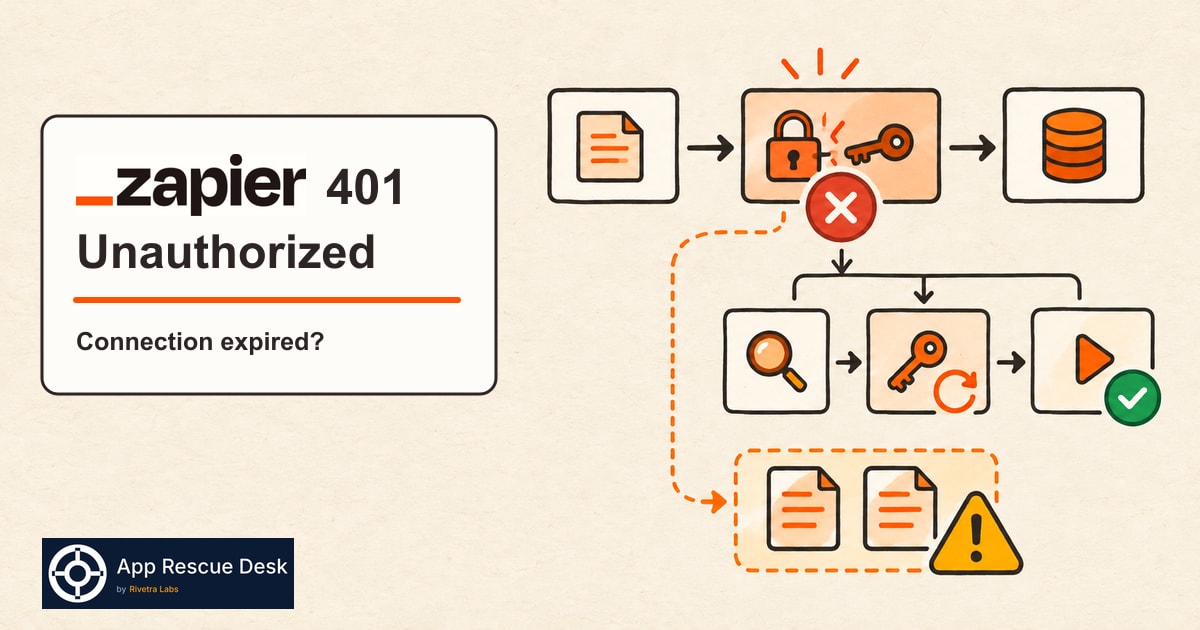
Start with the app connection used by the first failed step. Test that connection. Reconnect it if Zapier marks it as expired. Then run one controlled test before you replay historical tasks.
Every platform claim below was checked against Zapier documentation on 2026-10-23.
What does a Zapier 401 Unauthorized error mean?
Zapier sends a request to the connected app when an action runs. The app returns 401 Unauthorized when that request has no valid credentials.
Zapier lists several common causes:
- the access token expired or was revoked;
- the password changed in the connected app;
- the app now applies a session or security policy;
- the connection did not complete correctly.
The failed step matters. A Zap can read a trigger through one connection and fail later through a different connection. Do not reconnect every account in the workspace because one action returned 401.
How do you find the connection that caused the Zapier 401 error?
Open one recent failed run in Zap History. Use a run that represents the real production failure, not an editor test with different input.
- Open Zap History.
- Filter by the affected Zap and failure time.
- Open one failed run.
- Select the first errored step.
- Confirm that the step shows
401,UnauthorizedorNot authenticated. - Note the app and connection used by that step.
Zap History shows the version used for the run and the data each step received and sent. This separates a connection failure from a later data problem.
How do you test and reconnect an expired Zapier app connection?
Open App Connections in Zapier. Find the exact connection from the failed step.
- Open the connection menu.
- Select Test connection.
- Read the connection status.
- Select Reconnect if the status is expired.
- Complete the provider sign-in.
- Test the connection again.
Use an account that has permission to perform the failed action. A valid sign-in is not enough if the account can view a record but cannot update it.
Reconnecting an existing app connection can affect every Zap that uses it. Check the connection owner and the number of dependent Zaps before you change it. Do not delete the old connection as a troubleshooting shortcut.
What should you test after reconnecting the Zapier app connection?
Run one controlled case through the published Zap. Use an input you can identify in the destination system. If that input produces no run in Zap History at all, the problem is on the trigger side, not in the reconnected action: follow the checks for a Zapier trigger that creates no new run.
Check three things:
- The repaired step no longer returns
401. - The next step receives the expected fields.
- The destination contains one correct result.
A successful connection test proves that the account can authenticate now. It does not prove that missed runs completed, that earlier actions left no side effects or that every historical task is safe to replay.
Which failed Zapier tasks are safe to replay after a 401 fix?
Zapier can replay failed action steps from Zap History. It can also replay an entire run from the editor. These are different operations.
Replaying an errored action normally retries the steps that stopped with an error. Replaying the entire run starts again from the trigger and can repeat successful action steps. That matters when an earlier step already sent an email, created an invoice or added a CRM record.
Before replaying a backlog, compare the run history with the destination system. Classify the affected items as:
- missing;
- completed once;
- completed more than once;
- unclear.
Replay only the group whose current state you can verify. If the same business identifier appears in several runs, stop and establish which record is authoritative first. Before you delete a copy, trace which Zap run created each duplicate record.
If the failed step shows Soft timeout limit reached instead of 401, the action may already have completed: check whether the timed-out Zapier action finished before you replay it.
What if the Zapier connection is active but the step still returns 401?
An active status narrows the diagnosis but does not close it. Check whether the connected app changed the account role, required plan, organization policy or token scope.
Also confirm that the failed step uses the connection you tested. Similar connection names can hide an old account or a former employee’s connection.
If the request authenticates but the account lacks permission for the action, the provider often returns 403 Forbidden instead. Treat that as a permission problem rather than repeating the reconnect loop.
When does a Zapier 401 error need a wider repair?
The connection test is a good self-service fix when one token expired and one controlled run succeeds afterward.
The incident is wider when:
- several Zaps share the failed connection;
- the connection owner left the organization;
- missed runs contain customer orders, leads or invoices;
- earlier steps completed before the authentication failure;
- replays have already created duplicate records;
- the repair requires changes in both Zapier and the connected application.
At that point, the work is no longer only “reconnect the app.” It includes establishing the affected time range, verifying destination records and defining a replay boundary. Our Zapier fix service covers that work, and you reconnect the app yourself, so we never need your passwords.
Frequently asked questions about Zapier 401 Unauthorized errors
Does Zapier 401 Unauthorized always mean the app connection expired?
No. An expired or revoked token is common, but a password change, security policy or incomplete connection can produce the same response. Test the exact connection used by the failed step.
Can reconnecting one Zapier app connection affect other Zaps?
Yes. One app connection can be used by several Zaps and other Zapier products. Check its owner and dependent workflows before reconnecting or replacing it.
Is it safe to replay every Zapier task after fixing a 401 error?
Not without checking the destination. A failed run can contain successful earlier steps. A full replay can repeat those actions and create duplicate messages, charges or records.
What proves that a Zapier 401 Unauthorized error is fixed?
The repaired step must authenticate in a controlled run, and the expected destination result must appear once. A green connection test by itself does not verify the complete business flow.